
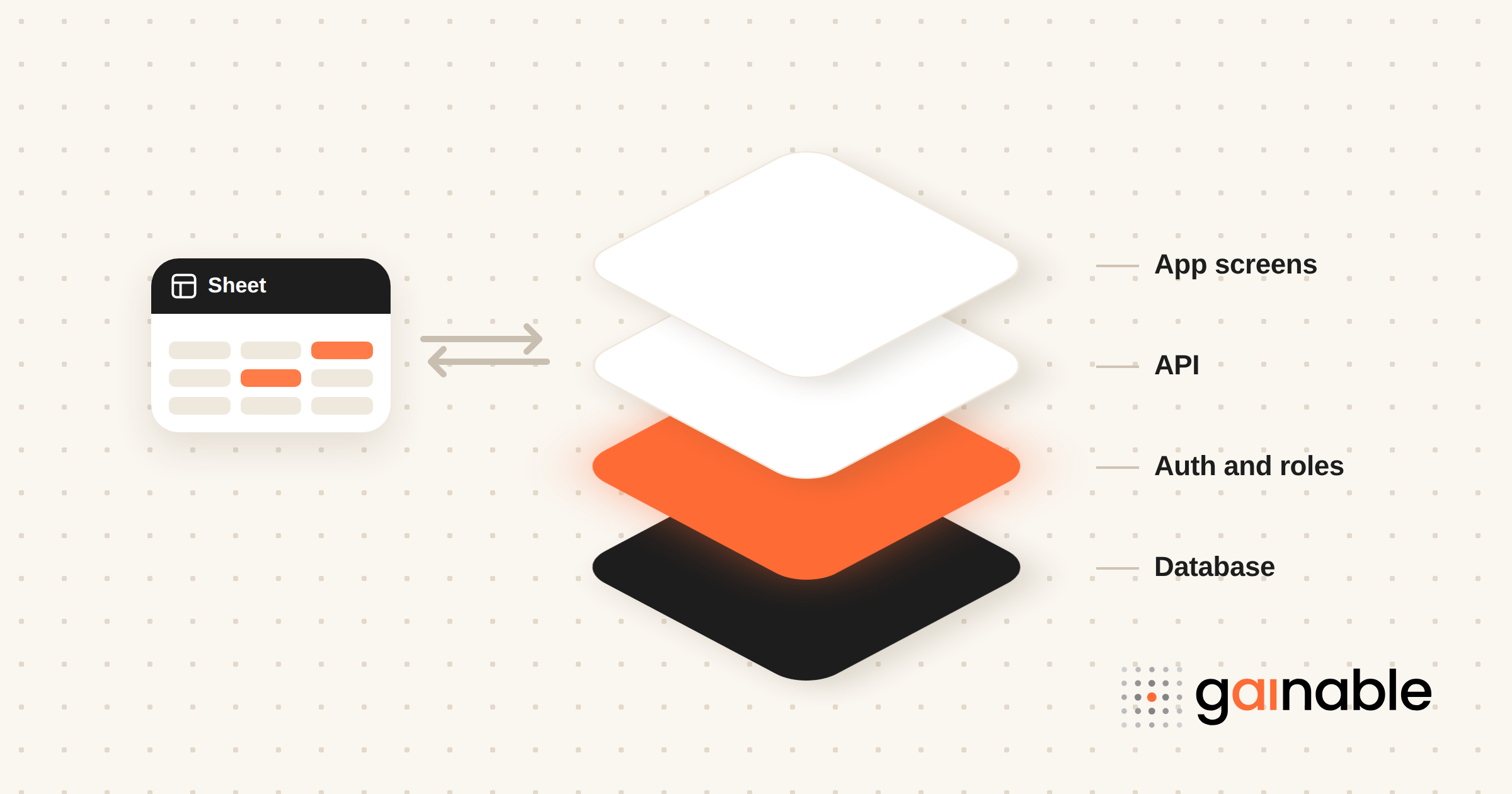
Yes, you can build production-ready full-stack apps without writing code, and for most operational use cases, it works well. The trade-off is simple: you get speed and accessibility in exchange for watching two things closely, how portable your app stays and how deep your customization can go. Below, we walk through what these platforms produce, how to evaluate one, and how we approach the problem at Gainable.
TL;DR:
- Full-stack no-code platforms generate a working frontend, backend, database, authentication, and APIs directly from your data or connected tools.
- Hosted versus code-export changes your portability; ask what happens to your app and data if you leave before you commit.
- Data modeling, merging, and two-way sync keep data consistent across sources instead of creating competing copies.
- Security essentials include role-based access, audit logs, and encryption matched to your industry’s compliance requirements.
- No-code fits rapid pilots, internal tools, and spreadsheet replacements; deep customization or extreme scale can still need engineers.
Table of Contents
- What a no-code full-stack platform actually builds
- The features that separate a real full-stack tool from a form builder
- How to choose the right no-code full-stack approach
- How Gainable builds production apps straight from your spreadsheets
- Keeping a no-code app healthy after launch
- Comparing the popular no-code full-stack platforms
- Security and compliance in no-code full-stack tools
- Scalability and performance as your app grows
- Where no-code full-stack platforms still fall short
- When no-code full-stack is the right call, and when it is not
- Getting started with Gainable
- FAQ
- Sources
- Recommended
What a no-code full-stack platform actually builds
When people hear “no code full stack,” they picture something half-finished, a pretty screen with nothing behind it. That is not what the better platforms deliver anymore. A full-stack build includes a working frontend, a backend, a database, authentication, and often a set of APIs, all generated together instead of stitched by hand.
Here is what that typically looks like in practice:
- Frontend screens built from your own data, not generic templates waiting to be customized.
- A data model and schema derived from your existing records, spreadsheets, or connected tools.
- Backend services that handle logic, validation, and data processing behind the scenes.
- Authentication and role management, so different people see different things based on permission level.
- APIs, so other systems can read from or write to the app.
- Hosting and deployment, usually handled for you the moment the app is generated.
The bigger distinction to understand is between hosted platforms and code-export platforms. A hosted product runs entirely on the vendor’s infrastructure. You get speed, but if you ever need to leave, you are migrating from scratch. A code-export platform hands you the underlying code, which costs you a bit more setup friction up front but protects you from being stuck later. Neither approach is wrong, but picking blind is.
“Production-ready” gets thrown around loosely in this space, so it is worth being specific. At minimum, it should mean monitoring so you know when something breaks, audit logs so you can trace who changed what, backups so a mistake does not cost you your data, and role-based access so sensitive information stays with the right people. If a platform cannot check those four boxes, it is a prototype tool wearing a production label.
The features that separate a real full-stack tool from a form builder
A lot of “no-code” products are form builders with a nicer coat of paint. What makes something full-stack is the plumbing underneath, the parts you do not see but rely on every day.
Data modeling sits at the center of it. When a platform can merge information from multiple sources into one coherent structure, a single source of truth, you stop fighting version conflicts between a spreadsheet, a CRM export, and whatever someone emailed last week. Without that merge step, you are just building a prettier spreadsheet.
The features worth checking for:
- Data modeling and merging, so scattered records become one consistent structure instead of competing copies.
- Connectors with two-way sync, meaning changes in your app write back to your spreadsheet or CRM instead of staying trapped.
- Built-in authentication and security controls, not bolted on as an afterthought.
- An API layer, so your app can talk to other systems without custom development.
- AI-assisted automations, where the system can monitor activity and draft actions for a human to approve.
- In-app collaboration, like comments, chat, or file attachments, so conversations happen next to the data they reference instead of in a separate thread.
On automation, the industry is still finding its footing. The 2025 Stack Overflow developer survey found that a majority of developers, 52%, either don’t use AI agents or stick to simpler AI tools. That caution is healthy. Agents are useful accelerants for repetitive work, not a replacement for a team that understands its own process.
Pro Tip: Before you commit to a platform, ask to see two-way sync in action with your own spreadsheet, not a demo file. Stale data is the fastest way to lose trust in a new tool.
How to choose the right no-code full-stack approach
Picking a platform without a framework is how teams end up locked into something that cannot grow with them. Before you sit through another demo, run the decision through this checklist.
- Portability. Can you export code if you need to leave, or are you permanently tied to the vendor’s infrastructure?
- Integrations. Does it connect natively to the tools you already use, or will you need custom middleware?
- Data ownership. Who controls the underlying data once it lives inside the platform?
- Security and compliance. Does it support the access controls and audit trails your industry requires?
- Scaling and performance. What happens to speed and reliability as your user count or data volume grows?
- Customization limits. Can you adjust business logic deeply, or only cosmetic details like colors and layout?
- Cost model. Are you paying per builder, per end user, or some hybrid, and how does that scale with adoption?
- Support and SLAs. What response time can you expect if something breaks in production?
A few trade-off questions are worth asking directly in any vendor demo:
- What happens to our app and data if we cancel the subscription?
- Can we export the underlying schema and code, and in what format?
- How does the platform handle a sync conflict between two data sources?
- What is included in the base price versus billed as an add-on?
Hosted managed platforms tend to win when speed matters more than long-term flexibility, think internal tools, pilots, or anything you expect to replace within a year or two. Exportable-code platforms earn their complexity when you are building something core to the business that you expect to maintain and extend for years.
On timeline: a pilot typically takes days to a couple of weeks. A usable MVP generally lands within a few weeks, varying with the complexity of your existing data. Full production rollout varies more, driven mainly by how many systems you need to connect and how strict your compliance requirements are. Before diving into vendor comparisons, it is worth reading through the common mistakes non-technical teams make when building their first app from a spreadsheet.
How Gainable builds production apps straight from your spreadsheets
We built Gainable around a simple observation: your spreadsheet already is the spec. Every column represents a decision someone already made about what matters in your process, so instead of asking you to describe your app in a prompt, Gaia reads your Excel file or Google Sheet directly and turns it into a data model. No prompting, no configuration wizard. Your columns define the structure.
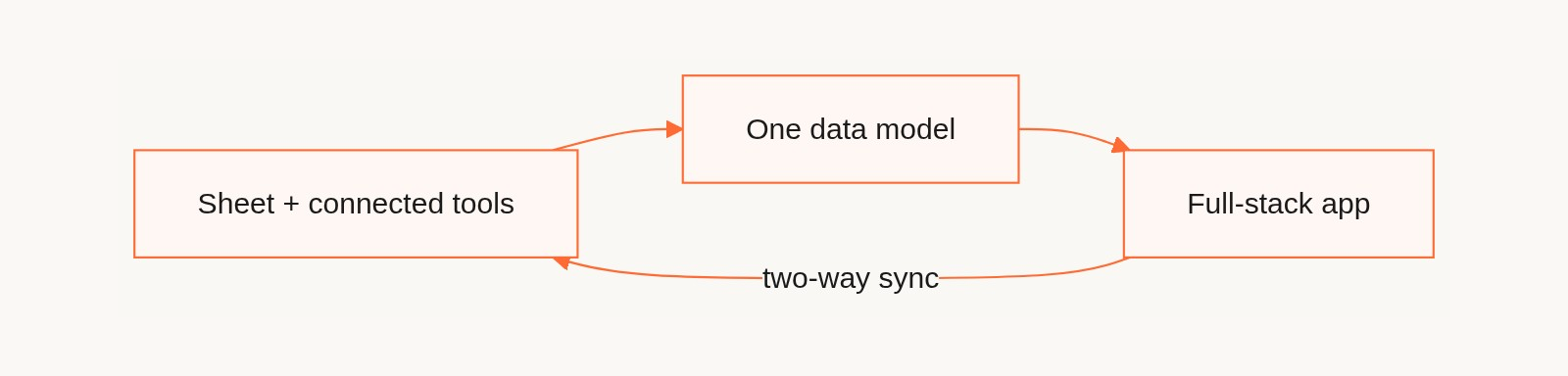
Most teams do not live in one spreadsheet, though. Gainable’s data connectors pull in tools like HubSpot, Salesforce, Airtable, Jira, Linear, and Stripe, and a data model merges them into one record on a key you choose, like email or customer ID, with source priority deciding which system wins when a field disagrees. For sources with write access, including Google Sheets, HubSpot, Salesforce, Airtable, Jira, and Linear, sync runs both ways, so the app writes changes back instead of leaving the source to go stale.
What comes out the other end is a working application, not a glorified export:
- A standard stack you can read. Apps are generated as Node.js and Express with a MongoDB database, with every change committed to the app’s git history. With author mode, your own coding agent can edit views, routes, and models directly, checked by the same validators the build uses.
- Sign-in and access control built in, with per-app access and an admin flag for each app user.
- Dashboards that update in real time rather than showing yesterday’s snapshot.
- Chat, comments, and file sharing that sit inside the records they reference, so collaboration happens where the work lives.
- A REST API for each app, with API keys for external integrations available on request.
We also built Gaia Autopilot for the recurring grind operations teams know too well: it watches app data, drafts actions for a person to approve, and records every trigger and decision in an action log. The team keeps working inside the app, the spreadsheet owner keeps their spreadsheet, and the export-email-copy-paste loop goes away.
Keeping a no-code app healthy after launch
Shipping the first version is the easy part. The test is whether the app still works cleanly six months later, after your data has grown and your process has shifted twice.
A few habits make the difference. Review your data model periodically, especially after adding a new connector or data source, since merged fields can drift out of alignment as source systems change their own structure. Keep an eye on sync health rather than assuming it runs silently and correctly forever; a broken connector that fails quietly is worse than one that throws an obvious error. Document who has access to what, and revisit permissions whenever someone changes roles or leaves the team.
Treat automations the same way you would treat any recurring business rule: revisit them when the underlying process changes, not just when something breaks. An automation built around last year’s sales pipeline will quietly misfire once that pipeline gets restructured. Finally, check your change history occasionally even when nothing seems wrong; catching a small data entry mistake early is much cheaper than untangling it three months later.
Comparing the popular no-code full-stack platforms
The no-code full-stack space splits roughly into two camps, and understanding which camp a platform belongs to matters more than comparing feature checklists line by line.
Agentic prototyping tools let you describe an app in natural language and get a working skeleton quickly. The trade-off is that prompt-driven generation still typically needs a developer to refine the result once requirements get specific, since natural language is an imprecise way to express exact business logic. The category also moves fast: Google’s Firebase Studio, whose App Prototyping agent could set up Cloud Firestore and Firebase Authentication from a description, closed new sign-ups in June 2026 and sunsets in March 2027, with existing workspaces pointed to Google AI Studio and Antigravity. That is the portability question from the checklist above, playing out in public.
Data-first platforms, our category at Gainable, start from your existing spreadsheets or connected systems instead of a prompt. The upside is that your columns already encode your process, so there is less translation lost between what you meant and what gets built. The trade-off is that this approach fits best when you already have structured data to point the platform at; it is less suited to a greenfield idea with no existing records.
Neither approach beats the other universally. The right fit depends on whether you are starting from an idea or starting from data you already maintain.
Security and compliance in no-code full-stack tools
Handing your data to a platform that builds the app for you naturally raises the question of who can see it and who is responsible when something goes wrong. These are fair concerns, and they deserve direct answers before you commit.
At minimum, look for role-based access control that lets you restrict who can view or edit specific records, not just who can log in. Audit logs matter just as much, since they give you a record of what changed and when, which becomes essential if you ever need to investigate an error or satisfy a compliance review. Ask directly how the platform encrypts data both at rest and in transit, and whether that extends to connected sources like your CRM or payment processor, not just the app’s own database.
Compliance requirements vary heavily by industry and region, so treat any platform’s general security page as a starting point, not a final answer for your specific obligations. If you operate in health care, finance, or another regulated space, verify the platform’s specific certifications against what your regulator requires, rather than assuming “secure” covers every box you need checked.
Scalability and performance as your app grows
A no-code app that handles 50 records smoothly can behave very differently at 50,000. Performance under load is one of the areas teams underestimate until it becomes a problem.
The two biggest factors are data volume and sync frequency. A platform with two-way sync across several connected tools is doing more work per update than a static app, so ask how sync performance holds up as your record count grows, not just how it looks in a demo with a handful of rows. Dashboard and reporting features can also slow down as data grows, since aggregating across thousands of records is a different computational problem than displaying a few dozen.
Hosted platforms generally handle scaling infrastructure for you, which is convenient until you hit a limit the vendor sets rather than one you control. That is part of why portability matters in the checklist above: an app that outgrows its platform needs somewhere to go.
Where no-code full-stack platforms still fall short
No-code full-stack tools solve real problems, but they are not a universal substitute for custom engineering, and pretending otherwise sets teams up for frustration.
Deep customization is the most common wall teams hit. If your business logic requires complex conditional workflows or highly specific calculations, some platforms abstract too much of the backend away to let you reach it. Backend control requires exposure to the database and API layer. If a platform only hides logic behind managed services, complex queries and row-level security may simply be out of reach.
Vendor lock-in is the other recurring regret. Founders who pick a platform-hosted solution with no export path often discover the cost later, usually right when they need deep customization or want to hand the project to an internal engineering team. If you expect to outgrow a platform eventually, prioritize portability from day one rather than treating it as a nice-to-have.
Agentic AI features, while promising, still need a careful eye. The same Stack Overflow survey found many developers remain cautious about agent-led workflows. Treat AI assistance as a speed boost for routine tasks, not a replacement for someone who understands the process.
When no-code full-stack is the right call, and when it is not
In our experience, no-code full-stack makes the most sense for rapid pilots, internal ops tools, and anything meant to replace a spreadsheet-and-email workflow. It is the fastest route from “we need this” to “people are using this” when your data already exists and your process is reasonably well defined.
Reach for engineers instead when you are dealing with heavy regulatory complexity, performance needs at a scale most platforms were not built for, or logic so specific that no data model will capture it cleanly. Before adopting either path, ask yourself three things: is our data already structured enough to build from, do we expect to outgrow this tool within two years, and can we tolerate some customization limits in exchange for speed today?
Getting started with Gainable
We built Gainable so the fastest way to a working app is the data you already have, not a blank canvas. Point Gaia at a spreadsheet or connect a tool like HubSpot or Stripe, and it builds a working application with sign-in, dashboards, and sync already in place.
Plans scale with how many people are building, not how many people are using the app: Solo is $99 per month with one builder seat, Team is $499 per month for up to 25 builders, and Enterprise starts from $4,999 per month with private infrastructure, SSO, and IT governance with audit logs. All plans are billed annually and include unlimited app users.
Check the pricing page for full plan details, or browse our data connectors to see if your tools are already supported before you start.
FAQ
Is there a free no-code app builder?
Several no-code platforms offer free tiers or trials, though the depth of features, like connectors, authentication, and automation, usually scales with paid plans. Check each platform’s own pricing page, since free-tier limits vary widely by vendor.
Is full stack coding?
Full stack traditionally refers to building both the frontend and backend of an application, which historically meant writing code for each layer. No-code full-stack platforms deliver the same outcome, a working frontend, backend, and database, without requiring you to write that code yourself.
Why is no-code becoming popular?
No-code platforms let non-technical team members build working apps directly from the data and processes they already manage, cutting out long development cycles for internal tools. Prompt-driven prototyping tools and data-first builders both show how quickly a working app can come together compared to traditional development timelines.
What are the top 10 no-code platforms?
There is no single official ranking of the top no-code platforms, since “best” depends heavily on whether you need agentic prototyping, data-first app generation, or simple form building. We approach it from the data-first angle at Gainable, building apps directly from your spreadsheets and connected tools rather than from a prompt.