Your campaigns deserve better than spreadsheets.
Spend data in one tool. Leads in another. Pipeline in a third. Build the dashboards and trackers your team actually needs, connected to live data and watched by Gaia Agents that alert when CTR drops or campaigns drift off plan.
Want campaigns that watch themselves. Gaia Autopilot alerts on the metric, not the dashboard →




Attribution blindness
You're accountable for pipeline, not just leads. But you can't connect campaign spend to actual sales outcomes. The data lives in five different tools and none of them talk to each other.
Hours wasted on reports
Every Monday you pull data from HubSpot, Google Analytics, and ad platforms into a spreadsheet. By the time it's formatted and shared, the numbers are already stale.
Blocked by engineering
You need a campaign tracker. A lead scoring tool. A reporting dashboard. Engineering has bigger priorities. Your team is stuck with workarounds that don't scale.
Stop reporting on last week.
Start acting on right now.
Pull data from HubSpot. Export Google Analytics. Copy ad spend from three platforms. Paste into a spreadsheet. Format it. Email it. Do it again next week.
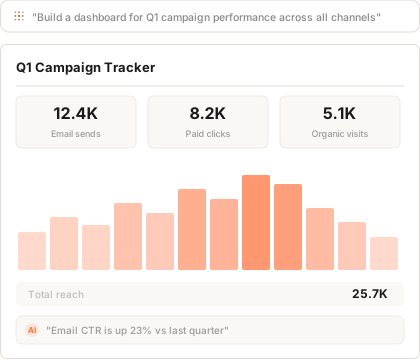
Connect your tools and Gainable builds a dashboard around your live campaign data. Refine the layout by asking. Query campaign performance in natural language. Share with your team.
What marketing teams build with Gainable
Real tools for real workflows. Built in minutes, not months.
Campaign performance dashboards
Track spend vs. pipeline vs. closed-won revenue per campaign. Connect HubSpot, Google Ads, and spreadsheets in one live view. No more Monday morning data pulls.
Lead scoring and routing
Build a custom intake tool that scores leads, routes them to sales by segment, and connects to your CRM. No more manual handoffs or leads falling through the cracks.
Audience segmentation
Combine CRM data with spreadsheet uploads to build custom audience segments. Tag, filter, and export. Reuse across campaigns without starting from scratch.
Revenue attribution
Connect campaign data to actual sales outcomes. See which channels drive revenue, not just clicks. Answer "what's working?" with data instead of guesswork.
Start personal. Go connected.
Build a campaign tracker
You need a better way to see this quarter's campaign ROI. Bring your campaign data (or describe what you want). Gainable builds it. Start using it immediately.
Add comparisons
Add last quarter's campaigns for comparison. Add a date range filter. Add a chart showing spend vs. return. The dashboard evolves as your questions get sharper.
Connect your tools
Plug in HubSpot and Google Ads. Campaign spend flows in live. Lead data updates automatically. No more manual exports.
Share with leadership
Your CMO wants this on the exec dashboard. Add a view for leadership. What started as your personal tracker is now how the company measures marketing impact.
Why not just use...
HubSpot dashboards?
Because HubSpot only shows HubSpot data. You can't combine ad spend, Google Analytics, and CRM data in one view. And custom reports still need an admin.
Gainable connects all your tools in one dashboard.
Looker / Tableau?
Because they require SQL skills or a BI analyst. Still need IT to approve data sources. Per-user pricing adds up fast for a dashboard your team checks weekly.
Connect your data. No SQL required.
Spreadsheets?
Because spreadsheets are always out of date. They break when two people edit at once. And they can't pull live data from your ad platforms or CRM.
Build dashboards that update themselves.
Your campaigns. Your data.
Your dashboard.
No more Monday morning data pulls. No more stale reports. Connect your tools, get a working dashboard, refine by asking. Start today.
Build your marketing dashboardFree for 7 days, no credit card. Every app you build stays live.