Your spreadsheet already describes the app.
You've been the human middleware between systems for years. Pulling reports, normalizing tabs, emailing PDFs around. Point Gainable at the spreadsheet you already maintain, the CRM you already use, the warehouse you already pull from. Gaia reads the schema and the working app shows up around it. Data is the new prompt.
Want it watching your numbers between reports. Gaia Autopilot catches breaches early →
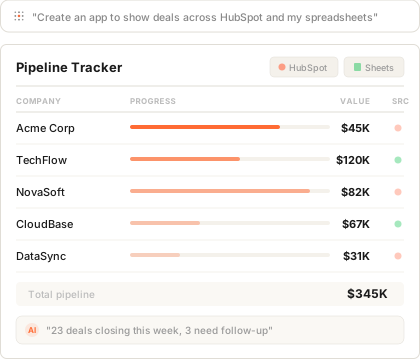




You already know how the data fits together
The schema is in your head, in your spreadsheets, in your VLOOKUPs. Articulating it as a prompt loses the half you can't put into words. So skip the prompt. Show Gaia the data.
Five tabs, one process
Revenue in HubSpot. Customers in Google Sheets. Forecasts in Salesforce. The columns line up in your head. They never line up in one app.
A ticket from last quarter
You filed it in March. Engineering has bigger priorities. You're still pulling the Monday report by hand. Tomorrow you'll do it again.
Tools that 70% fit
You've evaluated four. None handle the way your data actually flows. You've shimmed the gap with Zapier. The shim is now a load-bearing wall.
The schema describes the workflow
better than you could.
You don't have to articulate the app. Articulating it would mean translating tacit knowledge into prose, and most of it doesn't translate. Plug in the data. Gaia reads field names, types, sample rows, and relationships, then proposes the working app. From there, refine through conversation: ask for a different view, an extra filter, a column you wish you had.
Connect
Plug in HubSpot, the warehouse, the spreadsheet, the database. As many as you want. Authenticate once.
Gaia reads it
Field names, types, relationships, sample rows. The schema becomes the spec. The working app gets proposed in minutes.
Refine by asking
Prompting is for iteration, not for entry. Ask for a kanban view, a new filter, a renamed column. Gaia adjusts.
From middleware to operator.
Open four tabs. Run the report. Export to CSV. Paste into the master sheet. Format. Email it. Answer five questions about why a number changed. Repeat next week.
Connect the four sources. Gaia reads them and the unified app appears. The Copilot answers questions from your live data. Autopilot drafts the Monday report and lands it for your approval. You stop being middleware.
Apps that show up when you plug in
Inferred from your data, refined by asking. No templates, no setup wizard. The workflow you already run becomes the app you actually use.
Revenue + pipeline view
Plug in HubSpot deals and the Google Sheet your forecast lives in. Gaia merges them. Filter by rep, stage, or region. The Copilot answers pipeline questions in natural language.
One model from five systems
Connect five sources. Gaia normalizes the schemas, infers the relationships, and gives you a single app to act in. No ETL, no data engineer, no quarterly project.
Handoff and process trackers
Plug in the spreadsheet you use for handoffs and onboarding. Gaia reads the columns and turns it into a tracker with chat, comments, and a real audit trail.
Board prep that runs itself
Connect your KPIs source. Gaia builds the dashboard. Autopilot drafts the weekly snapshot and the variance commentary, ready for you to approve before Monday.
The app maintains itself between reports.
Autopilot lives inside every app and watches the objectives your data implies. Drafts land in your inbox. You approve, edit, or skip. You stay in control. The work happens anyway.
SLA enforcer
Tracks time-to-resolution against the targets in your data. Flags claims, tickets, or cases that are about to breach.
Inventory watchdog
Watches stock against reorder points. Drafts the purchase order. Sends you the queue, not the surprise stockout.
Weekly digest
Drafts the Monday report. Pulls the numbers, writes the commentary, lands it in your inbox to review before send.
Anomaly detector
Flags unusual payouts, refunds, or volume swings before they ship. You get the explanation, not the surprise.
Plug in personal. Grow into team.
Plug in your spreadsheet
The one you already maintain. Meeting notes, deal tracker, ops log, whatever it is. Gaia reads it and the working app shows up around your data. No IT approval needed.
Refine through conversation
Ask for a kanban view, a new column, a follow-up reminder. Gaia adjusts. The app evolves around the data without breaking what already works.
Connect the live source
Plug in HubSpot or your warehouse. Your manual fields become live data. Your "Customer" column becomes a live dropdown of CRM contacts. Everything clicks.
Share with the team
Invite collaborators. Add chat, comments, and role-based access. What started as your personal tool is now how the team runs the process. Built around your data, not a developer.
Why not just use...
Spreadsheets?
Spreadsheets describe your workflow well. They just don't run it. They disconnect from the source the moment you export. They break when two people edit at once. They can't watch for breaches between Monday reports.
Plug the same spreadsheet into Gainable. The schema describes the app. Gaia builds it.
Retool?
Retool needs a developer. SQL, JavaScript, engineering hours. The internal tools backlog grows because there aren't enough engineers, not because the tools are hard.
Connect the data yourself. Gaia reads it. The app shows up. IT validates, doesn't bottleneck.
Replit or Lovable?
Vibe-coding tools start with a prompt box. The articulation gap is brutal. Translating tacit operator knowledge into a prompt loses the half that lives in the spreadsheet's structure.
Skip the prompt. Show Gaia the data. The schema describes the workflow better than you could.
Plug in your data.
The app shows up around it.
Connect the spreadsheet you already maintain or the systems you already pull from. Gaia reads the schema and proposes the working app. Refine by asking. Autopilot keeps it current between reports.
Connect your dataFree for 7 days, no credit card. Every app you build stays live.