Yesterday's numbers don't move today's inventory.
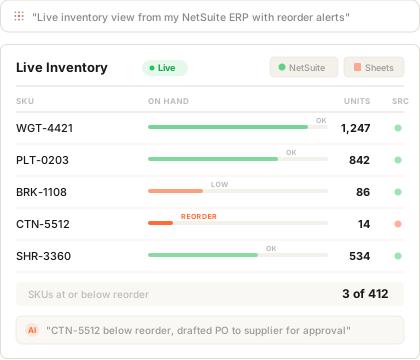
Your ERP exports to Excel. You email the file every morning. Your team has yesterday's numbers when today's pick list goes out. Connect your ERP data and run a live inventory app: current counts, reorder alerts, discrepancy flags. The team sees what's on the shelf right now, not what was on it at 5pm yesterday.
Want it watching reorder points and drafting the PO. Gaia Autopilot catches the stockout early →




The shelf is real-time. Your visibility isn't.
Receiving moved 200 units this morning. Picking pulled 47. Quality flagged a box for inspection. None of it shows up in the report until tomorrow. The exception happens today.
The morning email
Export from the ERP. Open in Excel. Format the columns. Save as PDF. Email it to the team. By the time it arrives, three things have already changed on the shelf.
A stockout you saw coming
SKU was at reorder point on Tuesday. Nobody pulled the trigger because the report came out on Wednesday morning. By Wednesday afternoon you're shipping apologies instead of orders.
A count that doesn't tie out
System says 412. Cycle count says 397. You spend the afternoon reconstructing the movement from receiving sheets and pick lists. The discrepancy already cost the customer.
Your inventory table describes the app
better than you could.
You don't have to draft a spec. The columns in your inventory data (SKU, location, on-hand, reorder point, last movement) already describe the workflow. Plug it in. Gaia reads field names, types, sample rows, and the relationship between SKUs and locations, then proposes the working inventory app. Refine through conversation: ask for a reorder view, a discrepancy log, a per-aisle filter.
Connect
Plug in your ERP, the warehouse spreadsheet, the WMS, the order management system. As many as you want. Authenticate once.
Gaia reads it
SKU, location, on-hand, reorder point, last movement. The schema becomes the spec. The working inventory app gets proposed in minutes.
Refine by asking
Ask for a low-stock alert view, a discrepancy log, a per-aisle filter. Gaia adjusts.
From morning email to live floor.
Pull the report from the ERP at 6am. Paste into the master sheet. Highlight reorders. Save as PDF. Email it to the floor. Field questions about why a SKU isn't where the report says it is. Reconcile cycle counts. Email the update at 6pm. Repeat.
Connect ERP data. The inventory app appears. The floor sees current counts. Reorder alerts surface as they cross threshold. Cycle count discrepancies log on the SKU record with photos. Autopilot drafts the PO before the stockout.
Apps that show up when you plug in
Inferred from your inventory and movement data, refined by asking. No templates, no setup wizard. The process you already run becomes the app you actually use.
Live inventory view
Current on-hand by SKU and location. Filter by aisle, by category, by reorder status. The floor and the planner look at the same number at the same time.
Reorder and PO drafts
When stock crosses reorder point, the SKU surfaces in a queue. Autopilot drafts the purchase order from your supplier rules. You approve, edit, or skip.
Discrepancy log
Cycle count vs system. Receiving vs PO. Pick exceptions. Each entry logs on the SKU record with photos, notes, and the resolution. The audit trail writes itself.
Movement and velocity dashboard
Throughput by zone, dead stock by SKU, slow movers by category. The Copilot answers in natural language: "which SKUs haven't moved in 90 days?"
The app catches the stockout before the customer does.
Autopilot lives inside every app and watches the thresholds your inventory data implies. Drafts land in your inbox. You approve, edit, or skip. You stay in control. The reorders happen anyway.
Reorder watchdog
Watches stock against reorder points. Drafts the PO. Sends you the queue, not the surprise stockout.
Discrepancy detector
Flags counts that don't tie out. Pulls the movement history, drafts the explanation, lands it for your review.
Daily floor digest
Drafts the morning summary. Reorders, exceptions, slow movers. Lands it in your inbox before the floor starts pulling.
Velocity watcher
Flags SKUs whose movement pattern has shifted. Spike, dropoff, dead stock. You get the explanation, not the surprise.
Plug in personal. Grow into team.
Plug in the morning export
The Excel file you email every morning. Gaia reads it and the working inventory app shows up around your data. No IT approval needed.
Refine through conversation
Ask for a low-stock view, a per-aisle filter, a discrepancy log. Gaia adjusts. The app evolves around your process without breaking what already works.
Connect the live ERP
Plug in your ERP or WMS. The static export becomes live data. The morning email becomes a live screen the floor opens at the start of shift.
Share with the team
Invite receiving, picking, planning. Each role gets the view that fits their job. Comments live on the SKU. The discrepancy log writes itself.
Why not just use...
The ERP's built-in inventory module?
SAP, NetSuite, and Dynamics all have inventory screens. They were designed for the planner, not the floor. The floor uses the morning email anyway because that's where the work fits.
Keep the ERP as the source of truth. Connect it. Get the floor app shaped around the work your team is actually doing.
A dedicated WMS?
A WMS is a six-figure project with a year of implementation. By the time it ships, the workflow has changed. And it still doesn't drift to fit how your team works week to week.
Stand up a working app today. Refine by asking. The platform changes with the workflow, not against it.
A Power BI dashboard?
Power BI is great at telling you the SKU is below reorder point. It can't draft the PO. It's read-only. There's nowhere for receiving's photo of the damaged box to live. By the time the dashboard refreshes, the moment to act has passed.
Dashboards watch. Gainable apps act. Same data, plus the place to do something about it.
Plug in your ERP data.
The live inventory app shows up around it.
Connect the morning export or the ERP you already pull from. Gaia reads the schema and proposes the working app. Refine by asking. Autopilot catches the reorder before the stockout.
Connect your dataFree for 7 days, no credit card. Every app you build stays live.