See your deals the way you actually work.
Your CRM shows what the company wants to see. Build the dashboard that shows what you need to see. Your deals, your way, with a Gaia Copilot that answers pipeline questions in natural language and Gaia Agents that draft your follow-ups before deals go cold.
Want the autonomous side. Gaia Autopilot drafts your follow-ups →






CRM doesn't flex
Salesforce shows what the org needs, not what you need. Custom views require an admin. Custom fields take weeks. You end up tracking deals in a spreadsheet anyway.
Pipeline is foggy
You can't answer "which accounts are at risk?" without pulling a report, filtering it, and squinting at a spreadsheet. Simple questions take 30 minutes to answer.
Waiting on RevOps
You need a custom view of your pipeline. RevOps is backed up for months. By the time you get it, your territory has changed and the view is already wrong.
Stop fighting your CRM.
Start working alongside it.
Log into Salesforce. Run a report. Export to Excel. Filter by your territory. Add notes from memory. Copy into a slide for your manager. Repeat every Friday.
Connect your CRM and Gainable builds a live pipeline dashboard around your real deals. Refine the view by asking. Ask AI "which deals are at risk?" and get an answer in seconds.
What sales teams build with Gainable
Real tools for real workflows. Built in minutes, not months.
Personal pipeline dashboard
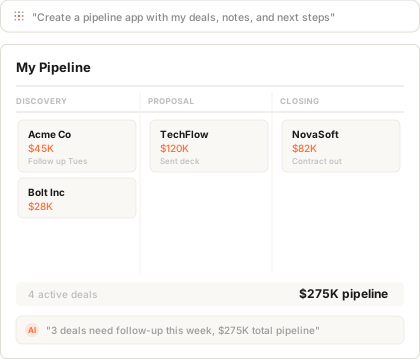
Your deals, your filters, your way. Filter by territory, stage, or deal size. Add custom fields your CRM doesn't support. AI answers pipeline questions in natural language.
Deal board
Kanban view of your pipeline with deal details, notes, and next steps. Track follow-ups and see what needs attention today - connected to your CRM so nothing falls through.
ROI calculators
Build account-specific ROI calculators you can customize for each prospect. Update them in minutes before a call. Share them live during demos instead of using generic slides.
Forecast tracking
Track your forecast against quota with live CRM data. See where you stand at any point in the quarter. No more spreadsheet forecasts that are wrong by the time you share them.
Start personal. Go connected.
Build your pipeline view
You need a better way to see your deals. Plug in your CRM (or describe what you want from scratch). Gainable builds your view around your pipeline. Start tracking your way immediately.
Add your own fields
Add deal probability scoring. Add a "risk" flag. Add next-step reminders. Your dashboard now tracks what matters to you, not just the org.
Connect your CRM
Plug in HubSpot or Salesforce. Your manual fields become live CRM data. Deal stages update automatically. No more double entry.
Share with your manager
Your manager wants the same view for the whole team. Add a team filter. What started as your personal dashboard is now how the team runs pipeline reviews.
Why not just use...
Salesforce views?
Because Salesforce views are rigid. Custom fields need an admin. Custom reports need RevOps. By the time you get your view, your territory has changed.
Build your own view. Change it whenever you want.
Spreadsheets?
Because spreadsheets disconnect from your CRM the moment you export. You're working with stale data. And they can't answer questions or remind you to follow up.
Live data. AI answers. Always up to date.
Clari / Gong?
Because they're built for the org, not for you. Enterprise pricing, IT approval, months of rollout. You need something that works for your deals today.
Start in five minutes. No IT approval needed.
Your pipeline. Your way.
Built by you.
No more fighting your CRM. No more waiting on RevOps. Connect your pipeline, get the view you need, refine by asking. Start selling.
Build your pipelineFree for 7 days, no credit card. Every app you build stays live.