
The most common failure when non-technical teams turn a spreadsheet into an app isn’t a bug. It’s launching a denormalized, unvalidated sheet as a live system with no rules stopping bad data from getting in. Fix the data model first. Add validation second. Everything else, permissions, sync, automation, gets easier once those two things are solid.
Here’s the fast version, with rough check times so you know what to run today.
- Flat spreadsheet tables → split into linked entities (customers, orders, items). Check time: 30 min.
- Wrong merge key (name instead of email/ID) → standardize on one unique identifier. 15 min.
- Duplicate records after sync → run a dedupe pass, flag by matched key. 20 min.
- One-way sync treated as live → confirm write-back is actually enabled. 10 min.
- Everyone has admin access → map roles to actual job functions. 20 min.
- Copy-paste handoffs replacing real workflow → find every manual export step. 15 min.
- No field validation → add required fields and type checks. 25 min.
- No audit log → check whether changes are even traceable. 10 min.
- Automations with silent side effects → review trigger logic for edge cases. 30 min.
- Manual override habit bypassing app rules → audit who’s editing outside the app. 15 min.
About 88% of spreadsheets contain errors, and most of them get carried straight into the new app unless someone stops to clean them first.
Key Takeaways
Spreadsheet-to-app failures almost always trace back to skipped data modeling and missing validation, not to the tools chosen for sync or hosting.
| Point | Details |
|---|---|
| Fix the data model first | Split flat sheets into linked entities with clear primary and foreign keys before anything else. |
| Pick one merge key | Standardize on email or account ID, never a name field, when combining sources like Salesforce and Stripe. |
| Test before rollout | Run 6 to 8 core test cases, including permission boundaries and sync reconciliation, in staging. |
| Run a 90 minute audit | Timebox sanity checks, data-model review, and permission validation before wider team rollout. |
| Consider a platform when scale hits | Gainable merges spreadsheets and connected tools into one app with two-way sync, roles, and audit logs built in. |
Table of Contents
- The 10 Most Common Non-Technical User App Mistakes
- Run a 60-90 Minute Audit Before You Roll Out Wider
- How to Test and Validate the App Before Handoff
- Should You Stick With Spreadsheets or Move to a Platform?
- A Faster Path Than Fixing the Spreadsheet Yourself
- Sources
The 10 Most Common Non-Technical User App Mistakes
These are the mistakes that show up again and again when ops teams, sales-ops leads, and founders convert spreadsheets or connected tools like Airtable and HubSpot into real applications. Each one includes a quick fix and the remediation steps to actually close it.
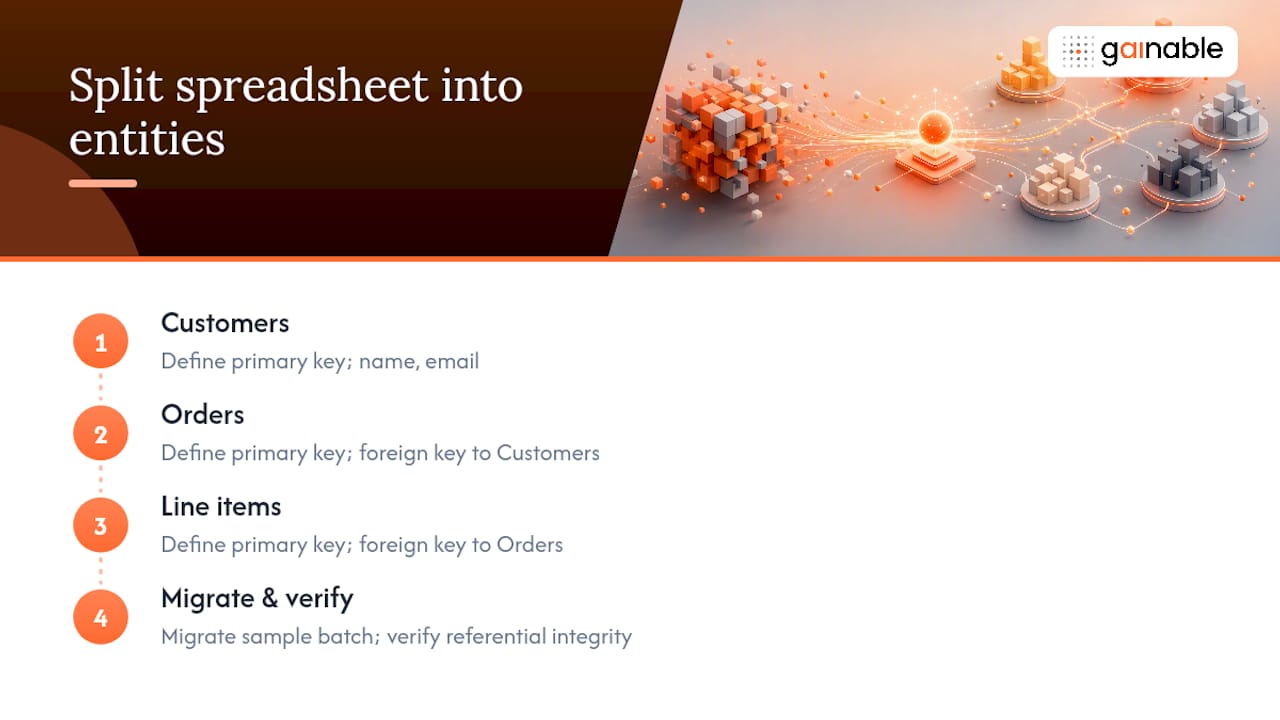
1. Carrying a flat spreadsheet structure into the app. A single wide tab with customer, order, and item info jammed into one row looks fine in Google Sheets but falls apart the moment two people edit it at once. Quick fix: split it into linked entities. Remediation: identify natural entities (customers, orders, line items), define a primary key for each, map foreign keys between them, migrate a sample batch, then verify referential integrity. Effort: 2 to 4 hours for a mid-size sheet.
2. Choosing the wrong merge key. Merging Salesforce and Stripe records on customer name instead of email or account ID creates silent mismatches. Quick fix: standardize on one unique, immutable identifier. Remediation: audit both source systems for a shared key, backfill missing IDs, re-run the merge, and spot-check 20 random matches. Effort: 1 to 3 hours.
3. Duplicate, stale, or conflicting records after sync. Two systems disagree on a customer’s status and nobody knows which one is right. Quick fix: define a single source of truth per field. Remediation: run a reconciliation report, flag conflicts, assign field-level ownership, and rerun sync. Effort: 2 to 5 hours depending on record volume.
4. Broken or one-way sync that goes stale. Someone assumes updates flow both ways, but the app only reads from Airtable and never writes back. Quick fix: confirm sync direction explicitly. Remediation: test a write in the app, check whether it appears in the source, document sync direction per field, and alert the team if it’s read-only. Effort: 30 to 60 minutes to verify, longer to fix.
5. Permissions and role misconfigurations. Giving everyone admin access “to keep things simple” is how a warehouse clerk accidentally deletes a pricing table. Quick fix: map roles to job functions. Remediation: list who needs read vs. write vs. admin, assign role-based access, test with a non-admin login, and audit quarterly.
6. Manual handoffs replacing real collaboration. Exporting a CSV, emailing it, and waiting for someone to paste it back in is not a workflow, it’s a liability. Quick fix: move comments and files into the record itself. Remediation: identify every export/email step, replace with in-app collaboration, and retrain the team on the new path.
7. Missing validation and constraints. Free-text fields where dates and dollar amounts should go create garbage that’s expensive to clean later. Quick fix: enforce data types at entry. Remediation: define required fields, set type and range constraints, test with intentionally bad input, and confirm the app rejects it.
8. No monitoring or audit logs. Without a trail, nobody can answer “who changed this and when.” Quick fix: turn on change logging. Remediation: enable audit logs, define who reviews them, set an alert threshold for unusual activity.
9. Automations with unintended side effects. An automation meant to send one email fires ten times because nobody tested the trigger condition. Quick fix: test automations against edge cases before enabling. Remediation: list every trigger, run each against boundary conditions, add a manual approval step for high-risk actions.
10. No plan for scale. The app works fine with 50 records and buckles at 5,000. Sheets performance tends to degrade noticeably as row counts increase, and the same pattern hits under-designed apps. Quick fix: load-test before wide rollout. Remediation: simulate peak concurrent use, monitor response times, and set a review trigger for when volume doubles.
Pro Tip: Build an idempotent import script, one that can run repeatedly without creating duplicates, before you touch production data. Run it against a copy first and reconcile the totals. This single habit catches more migration disasters than any other single step.
Run a 60-90 Minute Audit Before You Roll Out Wider
You don’t need a week to find your biggest risks. You need 90 focused minutes and a checklist.
- 0 to 15 minutes: sanity checks. Confirm the app opens, logs in correctly, and pulls live data from the source.
- 15 to 45 minutes: data-model review. Check for flat tables that should be split, missing keys, and orphaned records.
- 45 to 75 minutes: permissions and sync validation. Log in as a non-admin, test a write in each direction, confirm sync actually round-trips.
- 75 to 90 minutes: smoke tests and monitoring setup. Run through create, edit, and delete on a test record, then enable basic logging.
Prioritize by impact versus effort. A duplicate-record bug affecting every sales rep outranks a cosmetic dashboard issue every time.
Produce these artifacts as you go:
- A simple entity diagram (even hand-drawn)
- Results from 5 to 10 sample test cases
- A reconciliation spreadsheet comparing source vs. app totals
- One staged export as a rollback point
How to Test and Validate the App Before Handoff
Set up a staging environment first, never test directly against live data. Use an idempotent import script so repeated test runs don’t create duplicate junk.
Run these test cases before anyone else touches the app:
- Create a new record and confirm it syncs back to the source.
- Edit an existing record and check both systems update.
- Delete a record and verify it doesn’t silently reappear on next sync.
- Submit invalid data (wrong type, missing required field) and confirm it’s rejected.
- Log in with a restricted role and confirm blocked actions actually block.
- Force a sync conflict and check which value wins.
A short parallel-run period of two to four weeks with regular reconciliation catches most issues before they become team-wide fire drills.
Watch these metrics post-launch: failed sync attempts, duplicate record rate, and average response time. Set a threshold, and name who gets notified when it’s crossed.
Should You Stick With Spreadsheets or Move to a Platform?
Keep iterating on spreadsheets if you’re a single owner with low concurrency and low stakes if something breaks. Move to a platform once any of these show up:
- Multiple people edit the same data simultaneously
- A mistake would affect customer-facing operations, not just internal reporting
- You need an audit trail for compliance or accountability
- Spreadsheets lack transactional integrity and fine-grained permissions, and you’ve hit that wall
- Row counts have crossed into the tens of thousands and things are visibly slower
At minimum, require a relational data model, two-way sync, role-based access, audit logs, and validation rules before you call something a real platform.
Pro Tip: If your team spends more hours reconciling spreadsheets than analyzing what’s in them, that’s the threshold that says it’s time to move.
An Ops Leader’s Take on What Actually Fixes This
A clean data model plus real validation rules saves hours every week, and it’s the difference between catching a bad record and explaining a bad shipment to a customer. One team split a single “Orders” tab into customers, orders, and line items, added required fields, and cut reconciliation time nearly in half within a month.

A Faster Path Than Fixing the Spreadsheet Yourself
Every mistake in this checklist traces back to one root cause: spreadsheets were never built to be systems of record, and duct-taping fixes onto them only delays the real work. Gainable skips the duct tape. Point it at your Google Sheet, Excel file, or connected tools like HubSpot, Stripe, Salesforce, Airtable, Jira, or Linear, and it merges everything into one data model, on the key you choose, with two-way sync so the app writes back instead of going stale.
Role-based access and audit logs ship by default, so permission mix-ups and missing change trails stop being your problem to engineer. Gaia Autopilot watches for anomalies like duplicate records or sync failures and drafts a fix for you to approve, catching the issues section two of this guide asks you to hunt down manually. If your next step is turning a real spreadsheet into a real app, start with the Excel to app builder and see your own data modeled correctly in minutes.
Sources
- Converting Google Sheets into Web Apps | Shipkit
- Why Spreadsheets Are Killing Your Ops
- Custom Software vs Spreadsheets for Modern Operations