Retire the collections sheet on SharePoint.
Your collections sheet lives on SharePoint. Anyone with the link can corrupt it. Notes about payment arrangements live in Slack. Audit asks about a write-off and you have to reconstruct the story from email threads. Connect your AR data and Gainable builds a team app around it: AR team sees their accounts, controller has a read-only dashboard, notes live on the record with timestamps.
Want it watching aging buckets and drafting follow-ups. Gaia Autopilot catches the slips early →




Every close is a hunt for the truth
Your ERP is the system of record. Your team works in the spreadsheet. The controller works in the dashboard. None of them are looking at the same numbers at the same time. The reconciliation is the job.
A spreadsheet that everyone touches
Accounts live in QuickBooks or NetSuite. Aging buckets live in the shared sheet. Payment arrangements live in Slack. The next person to open the file might overwrite half of it.
Notes the auditor can't see
"They said they'd pay net 60." "Customer is in restructuring." Critical context lives in email threads and DMs. When audit asks why, you reconstruct the story from memory.
A board meeting that needs Friday's number
The controller goes into the board meeting hoping the collections number is current. You spent Thursday afternoon pulling it together. By Monday it's already stale.
Your AR table describes the app
better than you could.
You don't have to draft a spec. The columns in your AR data (customer, invoice, due date, amount, status) already describe the workflow. Plug it in. Gaia reads field names, types, sample rows, and the relationship between invoices and customers, then proposes the working collections app. Refine through conversation: ask for an aging bucket, a controller view, a write-off log.
Connect
Plug in your ERP, the SharePoint sheet, Stripe, the billing platform. As many as you want. Authenticate once.
Gaia reads it
Customer, invoice, due date, amount, status. The schema becomes the spec. The working collections app gets proposed in minutes.
Refine by asking
Ask for a 60/90/120 aging view, a controller dashboard, a notes column with timestamps. Gaia adjusts.
From spreadsheet jockey to AR operator.
Export the aging report. Paste into the shared sheet. Highlight what changed. Email the controller. Answer five questions about why a customer is in 90. Check Slack for the payment arrangement. Repeat next week.
Connect AR data. The collections app appears. Notes live on the record, with timestamps and author. Controller opens the dashboard before the meeting and the number is current. Autopilot drafts the follow-up emails on 60-day accounts for your approval.
Apps that show up when you plug in
Inferred from your AR and billing data, refined by asking. No templates, no setup wizard. The collections process you already run becomes the app you actually use.
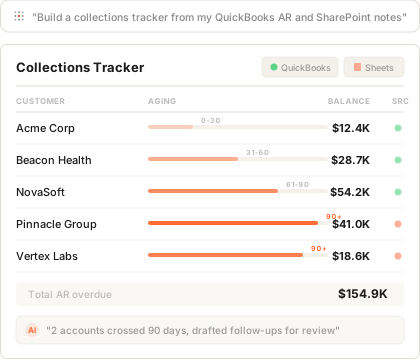
Collections tracker
Aging buckets that update from your ERP. Per-rep filtered views. Notes that live on the record. The controller gets a read-only dashboard with the same numbers.
AR aging dashboard
30/60/90/120. By customer, by salesperson, by region. Drill into any number and see the underlying invoices. The Copilot answers questions in natural language.
Write-off and dispute log
Plug in the spreadsheet you use for write-offs. Gaia turns it into a tracker with approval chain, comments, and an audit trail the auditor can actually read.
Board prep that runs itself
Connect your KPIs source. Gaia builds the controller dashboard. Autopilot drafts the weekly collections snapshot and the variance commentary, ready for review before Monday.
The app catches the slip before audit does.
Autopilot lives inside every app and watches the objectives your AR data implies. Drafts land in your inbox. You approve, edit, or skip. You stay in control. The follow-ups happen anyway.
Aging watcher
Flags accounts about to cross 60 or 90. Drafts the follow-up email with the latest payment arrangement note attached.
Anomaly detector
Spots unusual write-offs, refunds, or credit memos before they hit the books. You get the explanation, not the surprise.
Weekly collections digest
Drafts the Monday report. Pulls the aging numbers, writes the commentary, lands it in your inbox to review before send.
Audit-ready trail
Every note, every status change, every approval timestamped on the record. When audit asks, the answer is one click away.
Plug in personal. Grow into team.
Plug in the collections sheet
The one on SharePoint that everyone touches. Gaia reads it and the working collections app shows up around your data. No IT approval needed.
Refine through conversation
Ask for an aging bucket, a controller view, a notes column with timestamps. Gaia adjusts. The app evolves around your process without breaking what already works.
Connect the live ERP
Plug in QuickBooks, NetSuite, or whatever runs your books. The manual columns become live data. Your "Customer" column becomes a live dropdown of real accounts.
Share with the team
Invite the AR team and the controller. AR team edits, controller reads. Comments live on records. The audit trail writes itself.
Why not just use...
The SharePoint sheet?
It works until someone overwrites the formulas. There's no audit trail. There's no role-based access. The controller is reading a snapshot from Friday. Notes about payment arrangements live somewhere else entirely.
Plug the same sheet into Gainable. Get a real app with roles, history, and notes on the record.
The ERP's built-in module?
NetSuite has a collections module. So does Sage. So does your billing platform. They were designed for the accountant, not the AR clerk. The team uses the spreadsheet anyway because that's where the work fits.
Keep the ERP as the source of truth. Connect it. The team app shows up around the workflow your team actually runs.
A BI dashboard?
Power BI is great at telling you the AR aging number is bad. It can't help the team work the accounts. It's read-only. There's nowhere for notes to live. By the time you see the dashboard, the moment to follow up has passed.
Dashboards watch. Gainable apps act. Same data, plus the place to do something about it.
Plug in your AR data.
The collections app shows up around it.
Connect the SharePoint sheet or the ERP you already pull from. Gaia reads the schema and proposes the working app. Refine by asking. Autopilot keeps the aging buckets honest between Mondays.
Connect your dataFree for 7 days, no credit card. Every app you build stays live.