

TL;DR:
- Spreadsheets are prone to errors, lack security, and do not support team collaboration effectively.
- Replacing spreadsheets gradually with purpose-built tools improves data integrity, accountability, and decision-making.
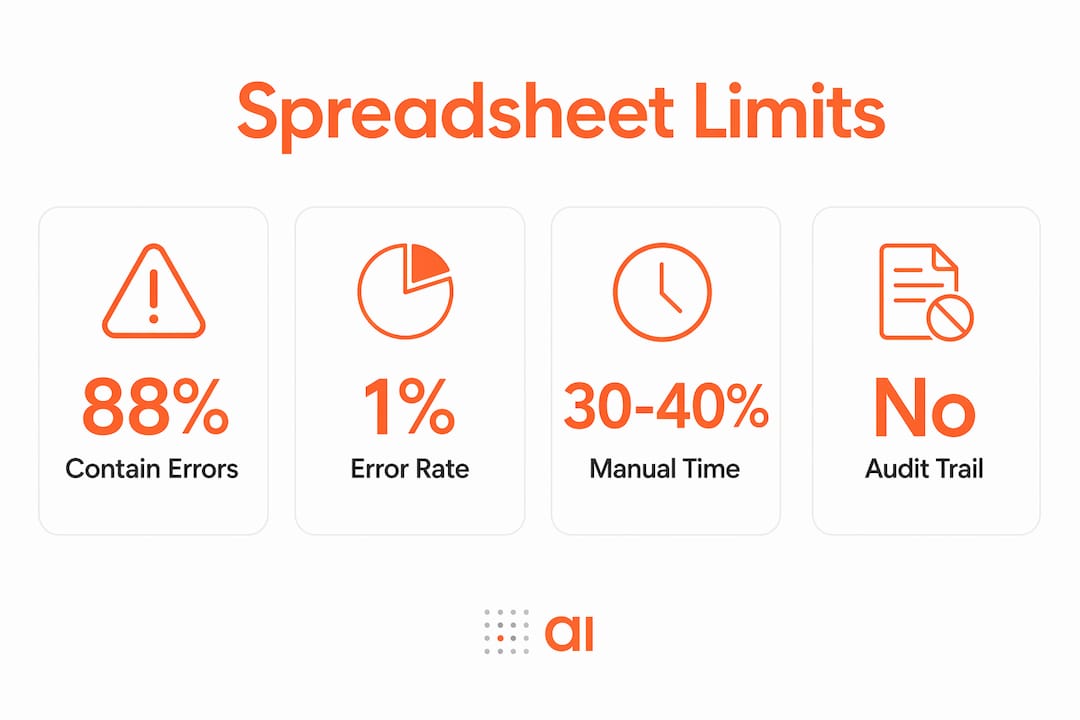
Spreadsheets are the most common source of operational failure for non-technical teams, not because teams use them wrong, but because the tool itself lacks the infrastructure that real team workflows require. Approximately 88% of spreadsheets contain errors, and that rate climbs as the number of cells grows. That figure alone explains why spreadsheets limit non-technical teams so consistently. No audit trails, no role-based permissions, and no real-time sync mean that every shared file is a liability dressed up as a system. If your team runs operations, sales tracking, or inventory from a spreadsheet, you are managing risk you probably cannot see.
What are the main limitations of spreadsheets for non-technical teams?
The core problem is that spreadsheets were built for individual analysis, not team operations. When a non-technical team adopts a spreadsheet as its central system, it inherits a set of structural weaknesses that compound over time.

The most damaging limitation is error rate. Errors are baseline at roughly 1% per cell, which means a 1,000-cell sheet carries around 10 errors at any given time. Most of those errors are invisible until they surface in a report or a decision that has already been made. That is not a data quality problem. That is a structural failure.
Collaboration is the second major gap. Spreadsheets were not designed for simultaneous editing with accountability. When two team members update the same file at different times, version conflicts appear. When someone emails a copy, you now have two sources of truth. Neither one is labeled “wrong.”
| Problem area | Business impact |
|---|---|
| Formula and data entry errors | Incorrect reports, bad decisions, financial exposure |
| Version conflicts | Confusion over which file is current, duplicated effort |
| No audit trail | No accountability, no way to trace who changed what |
| File-sharing security gaps | Sensitive data exposed to unintended recipients |
| Manual update cycles | Stale data, delayed reporting, missed opportunities |
Security is a third area that non-technical teams rarely think about until something goes wrong. Sharing a spreadsheet by email gives the recipient a full copy of every row, every formula, and every tab. There are no row-level permissions. There is no way to restrict what a viewer can see or export.
Spreadsheets lack the infrastructure controls that real operational systems require: audit logs, governance rules, and access permissions. Without those controls, the spreadsheet is not just a file. It is a single point of failure sitting in someone’s inbox.
Why do spreadsheets especially challenge non-technical teams?
Technical teams can read a formula, trace a broken reference, or rebuild a broken macro. Non-technical teams cannot, and that gap creates a specific kind of fragility that most managers do not recognize until it costs them.
Critical spreadsheet logic is often locked in complex hidden features accessible only to one or two people. Multi-tab formulas, named ranges, and conditional logic built by one analyst become a black box for everyone else. When that analyst leaves, goes on vacation, or moves to a different role, the team loses the ability to maintain or trust its own system.
This creates what you might call “tribal knowledge dependency.” The spreadsheet works, but only because one person understands it. That is not a system. That is a person wearing a system’s costume.
Non-technical teams also tend to over-trust their spreadsheets. The data looks clean, the totals add up, and the formatting looks professional. That confidence is exactly what makes errors so dangerous. Spreadsheet errors tend to surface only under stress, such as when the business scales, a vendor changes their data format, or a new team member updates a formula without realizing its downstream effects.
Here are the specific challenges non-technical teams face that technical teams typically avoid:
- No way to validate data at entry, so bad values go in unchecked
- No alerts when a formula breaks or a reference goes missing
- Workflow steps that exist only in someone’s memory, not in the file
- No visibility into what changed, when, or why
- Dependence on one person to maintain logic the rest of the team cannot read
Pro Tip: Map every spreadsheet your team uses to a single owner. If you cannot name one person who fully understands every formula in that file, you have already identified a structural risk worth addressing.
How do spreadsheet limits affect team collaboration and decision-making?
The operational consequences of spreadsheet-based workflows go well beyond data quality. They shape how your team communicates, how fast decisions get made, and how much trust people place in the numbers they see.
Version confusion is the most common symptom. When three people are working from three different copies of the same file, every meeting starts with the same question: “Which version are we looking at?” That question costs time. More importantly, it signals that the team does not have a single source of truth.
Senior leaders spend 30–40% of their time moving data manually between spreadsheets. That time is not analysis. It is not decision-making. It is copy-paste work that a properly designed system would eliminate entirely. When your most experienced people are acting as human middleware, the team is paying a high price for a low-quality process.
The accountability gap is equally damaging. Without an audit trail, you cannot answer basic questions: Who changed this number? When did this row get deleted? Why does this total not match last week’s report? Those questions matter in operations, in finance, and in any team where decisions depend on data being accurate and traceable.
Scaling makes every one of these problems worse. A spreadsheet that works for a team of five becomes unmanageable for a team of fifteen. More rows, more contributors, more versions, and more chances for the whole thing to break. The spreadsheet’s inability to scale is not a bug. It is a design limit that was never meant to be a team operating system.
What practical steps can non-technical teams take to overcome spreadsheet limitations?
Overcoming spreadsheet hurdles does not require a full technology overhaul. The most effective approach is gradual replacement, one workflow at a time, starting with the processes that cause the most pain.
- Identify your highest-risk spreadsheet. Look for the file that is shared most often, updated by the most people, or used to make financial or operational decisions. That file is your starting point.
- Replace one workflow, not the whole system. Pick a single process, such as inventory tracking, lead management, or invoice reconciliation, and move it to a purpose-built tool. Prove the concept before expanding.
- Choose tools that map onto your existing data. No-code and low-code platforms let you build apps from existing spreadsheets without requiring your team to learn a new data model from scratch. Your columns become the spec.
- Keep spreadsheets for ad hoc analysis. Spreadsheets are genuinely useful for one-off calculations, quick data exploration, and personal analysis. The problem starts when they become the backbone of a team process. Reserve them for what they do well.
- Train your team on the new tool using familiar concepts. The fastest way to get adoption is to show team members that the new system works like their spreadsheet, just with better controls. Dashboards, filters, and row-level records all map to concepts they already know.
Teams revert to spreadsheets not because they dislike new software, but because official tools slow them down or do not match how they actually work. The fix is not enforcement. It is designing a replacement that fits the team’s real process.
Pro Tip: When evaluating a replacement tool, test it against your most complex spreadsheet workflow first. If it cannot handle your hardest case, it will not stick.
Spreadsheet problems are structural failures, not just data errors. Gradual process replacement works better than sudden mandates because it lets teams build confidence in the new system while keeping operations running. The goal is not to eliminate spreadsheets. It is to stop using them as infrastructure they were never designed to be.
Key Takeaways
Spreadsheets limit non-technical teams because they lack audit trails, version control, and access permissions that real operational workflows require.
| Point | Details |
|---|---|
| Error rates are structural | 88% of spreadsheets contain errors; a 1,000-cell sheet averages around 10 errors at any time. |
| Hidden complexity creates risk | Critical logic locked in formulas known only to one person creates a single point of failure. |
| Collaboration breaks down fast | Version conflicts and no audit trail destroy accountability and slow down decisions. |
| Scaling exposes every weakness | Spreadsheet-based workflows that work for small teams break under growth and added contributors. |
| Gradual replacement works best | Replace one workflow at a time using tools that mirror familiar spreadsheet concepts. |
The honest case for moving on from spreadsheets
I have watched operations teams defend their spreadsheets the same way people defend a car that keeps breaking down. It is familiar, it is theirs, and fixing it feels easier than replacing it. That instinct is understandable. It is also expensive.
The spreadsheet your team trusts most is probably the one carrying the most risk. The more central it is to your operations, the more people touch it, and the more chances there are for something to break silently. I have seen finance teams discover a formula error that had been compounding for months. I have seen sales teams make quota decisions from a pipeline file that three people had edited into three different states. None of those teams thought they had a spreadsheet problem. They thought they had a data problem.
The shift I recommend is not dramatic. Stop treating spreadsheets as infrastructure. Use them for what they are genuinely good at: quick analysis, personal calculations, and one-off data exploration. For anything your team depends on daily, anything that feeds a decision or a report, build or adopt a system with real controls. The no-code tools available in 2026 make that transition accessible to non-technical teams without requiring a developer or a six-month implementation.
The teams that move fastest are not the ones with the biggest budgets. They are the ones that stop waiting for the spreadsheet to fail visibly before they act.
— Rickard
From spreadsheet to working app, without starting over
If your team’s operations still run on shared files and manual updates, Gainable gives you a direct path out.

Gainable reads your existing Excel files or Google Sheets and builds a working operations app from the data already there. No prompts, no rebuilding your data model from scratch. Your columns are the spec. The app ships with authentication, audit logs, dashboards, and live updates. It also connects to HubSpot, Stripe, Salesforce, and more, merging everything into one unified record. You can turn your spreadsheet into an app in minutes, and your team keeps working while the data stays current. Gaia Autopilot watches for anomalies and drafts actions for you to approve, clearing the recurring work before it piles up.
FAQ
What percentage of spreadsheets contain errors?
Approximately 88% of spreadsheets contain errors, with a baseline error rate of around 1% per cell. A 1,000-cell spreadsheet carries roughly 10 errors at any given time.
Why do non-technical teams struggle more with spreadsheets than technical teams?
Non-technical teams cannot read or repair complex formulas, macros, or multi-tab logic. When the one person who built the spreadsheet leaves or is unavailable, the entire workflow becomes unreliable.
How do spreadsheets restrict collaboration for growing teams?
Spreadsheet dependency creates version conflicts, unclear data ownership, and no audit trail, all of which reduce accountability and slow down decisions as team size increases.
Is it possible to replace spreadsheets without disrupting current workflows?
Yes. The most effective approach is replacing one workflow at a time, starting with the process that causes the most errors or confusion. Tools that read existing spreadsheet data and build apps from them reduce disruption significantly.
How much time do teams waste on manual spreadsheet work?
Senior leaders spend 30–40% of their time manually moving data between spreadsheets. That time goes toward copy-paste tasks that a purpose-built system would handle automatically.