

Contextual collaboration tools are defined as platforms that embed communication and data directly into the workflows where teams actually operate. Unlike standalone messaging apps or separate project trackers, these tools keep relevant information attached to the work itself, so your team never loses the thread. The role of contextual collaboration tools is to eliminate the gap between where data lives and where decisions get made. Research from Q1 2026 shows that 79% of workers in collaborative organizations feel well-prepared to adapt to emergent business challenges. That number reflects a real competitive edge, not just a feel-good metric.
How do contextual collaboration tools enhance effective teamwork?
Contextual collaboration tools reduce context switching by keeping conversations, data, and tasks in one place. When your sales rep updates a deal in your CRM, the discussion about that deal stays attached to the record. Nobody has to dig through email threads or ping three people to find out what happened last week.
The productivity gains come from a specific mechanism: embedding collaboration within business processes rather than treating communication as a separate activity. When a warehouse manager flags a shipment delay, the relevant order data, the team chat, and the corrective action all live together. That is the difference between a tool and a contextual collaboration tool.

Cross-functional teams benefit most from this setup. A sales manager, an operations lead, and a finance analyst can all look at the same live data and comment within the same context. Nobody is working from a stale export or a screenshot from last Tuesday.
Modern collaboration platforms that integrate chat, document editing, file sharing, and project management reduce cognitive load by minimizing app switching. Less app switching means more focused work. That is not a soft benefit. It shows up in output quality and response time.
Key ways these tools improve team dynamics:
- Shared data visibility: Everyone sees the same live information, so decisions are based on facts, not assumptions.
- Threaded discussions tied to records: Comments stay attached to the relevant deal, task, or document, not buried in a general chat.
- Real-time updates: Changes in data trigger immediate visibility for the whole team, not just the person who made them.
- Reduced handoff friction: When context travels with the work, handoffs between team members require less explanation.
Pro Tip: Set up your collaboration tool so that every comment or discussion is tied to a specific record or task. A general chat channel is useful, but context-attached threads are where real decisions get made.
What distinguishes contextual collaboration from traditional personalization?
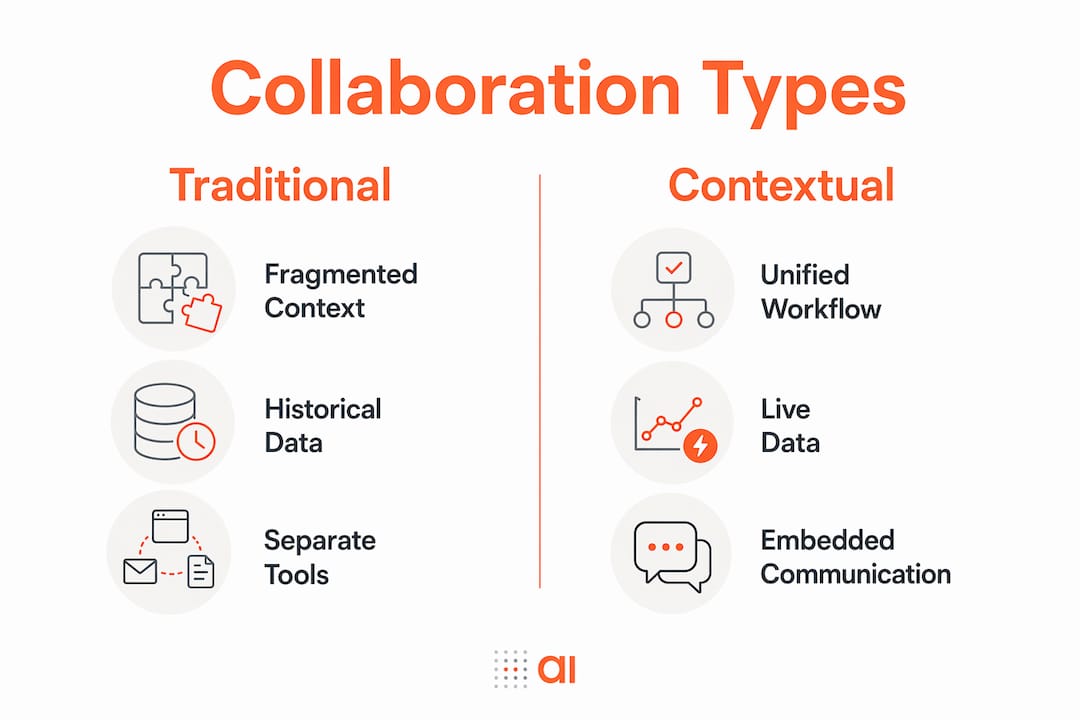
Traditional personalization relies on historical profiles. A system looks at what you did before and serves you content or suggestions based on that frozen snapshot. Contextual collaboration works differently. It interprets user intent through real-time behavior and language rather than static profiles.
Think of it this way. A personalization engine knows you bought a product six months ago. A contextual collaboration system knows you are currently reviewing a contract, your team just flagged a pricing issue, and your deadline is tomorrow. Those are completely different inputs, and they produce completely different outputs.
“Contextual collaboration represents a paradigm shift from static user profiles to dynamic, continuously updating context that better aligns with real-time workflows.” — Martech, 2026
The table below shows the practical difference between the two approaches:
| Dimension | Traditional personalization | Contextual collaboration |
|---|---|---|
| Data source | Historical user profile | Real-time behavior and language |
| Update frequency | Periodic or batch | Continuous |
| Interaction model | Predefined steps | Adaptive, fluid inputs |
| Team alignment | Individual-focused | Shared context across roles |
| AI role | Recommendation engine | Active participant in live workflow |
Contextual collaboration allows teams to fluidly adjust constraints and inputs in real time, with systems adapting alongside them. You do not need to fully specify your needs upfront. The system responds to what is happening now, not what happened before.
Effective contextual systems also handle evolving inputs and store intermediate states. That means a conversation that starts on Monday can pick up on Thursday with full context intact. No recap needed. No lost decisions.
What is the importance of shared AI context in team collaboration?
Shared AI context is the architecture where your team’s AI assistant has access to the full active project workspace, not just one person’s conversation history. Isolated AI assistants fragment team intelligence by giving each user a separate, disconnected view of the work.
Here is what that fragmentation looks like in practice. Your sales rep asks the AI to summarize a deal. Your operations lead asks the same AI about fulfillment status for the same account. If those two AI sessions do not share context, the AI gives two separate, unconnected answers. The team still has to manually connect the dots.
Shared AI context solves this by combining three elements:
- A shared canvas: All team members work in the same live workspace, so the AI reads the same state everyone else sees.
- Full project state access: The AI reads conversation history, data changes, and task updates across the whole team, not just one user’s session.
- Collaborative inputs: Team members can refine AI outputs together, building on each other’s queries rather than starting from scratch each time.
Shared AI context prevents intelligence fragmentation and reduces integration overhead. That means less time spent copying AI outputs from one tool into another and more time acting on them.
Governance matters here too. Not every team member should see every piece of data. Role-based permissions inside a shared AI context let you control who sees what, while still maintaining the shared workspace that makes AI useful at the team level.
Pro Tip: Before adopting an AI collaboration tool, ask one question: does the AI read the same live workspace that my whole team works in? If the answer is no, you are buying a personal assistant, not a team tool.
How can teams implement contextual collaboration tools effectively?
The biggest mistake teams make is adding more tools without fixing the underlying context problem. Fragmented context is the root cause of most collaboration inefficiencies. Adding AI features on top of siloed data does not fix fragmentation. It makes it worse.
The fix starts with building a shared, searchable knowledge layer. This is a unified layer of organizational knowledge that every AI assistant and every team member can access. Think of it as the single source of truth that travels with your work.
Practical steps for getting there:
- Audit your current context silos. List every place where project knowledge lives: email, spreadsheets, CRM notes, chat threads. That list is your fragmentation map.
- Connect your data sources first. Before adding collaboration features, make sure your core data (CRM, ERP, project tracker) feeds into one place. Tools like Gainable connect directly to sources like HubSpot and Stripe to auto-generate apps around your existing data.
- Attach conversations to records, not channels. Move team discussions from general chat into record-level comments. A comment on a specific deal or task carries more context than a message in a general channel.
- Keep context updated through the project lifecycle. Assign someone to maintain the shared workspace as the project evolves. Stale context is almost as bad as no context.
The distinction between context engineering and tool selection matters here. Context engineering means deliberately designing how information flows through your team. Tool selection is just picking software. Context engineering is more critical to collaboration success than the tools you choose.
You can read more about how fragmented data conversations hurt team alignment and what to do about it. The pattern is consistent across industries: teams that unify their context outperform teams that accumulate tools.
Key Takeaways
Contextual collaboration tools succeed because they unify data, conversation, and workflow into one shared environment, making context engineering more critical than tool selection.
| Point | Details |
|---|---|
| Context over tools | Fixing fragmented context matters more than adding new collaboration software. |
| Real-time beats historical | Dynamic, live context outperforms static user profiles for team alignment. |
| Shared AI context | AI assistants work best when they read the full team workspace, not individual sessions. |
| Embed communication in data | Attaching discussions to specific records reduces handoffs and lost decisions. |
| Governance enables scale | Role-based permissions let teams share AI context without exposing sensitive data. |
Why I think most teams are solving the wrong collaboration problem
I have watched teams spend months evaluating collaboration tools while their actual problem was never the tools. It was the context. They had five apps that all worked fine in isolation. The breakdown happened in the gaps between them.
The teams that made real progress did one thing differently. They stopped asking “which tool should we use?” and started asking “where does our context break down?” That question leads you somewhere useful. It points to the exact moment in a workflow where information stops traveling with the work.
The shift to shared AI context is the most significant change I have seen in collaboration technology in years. Not because AI is new, but because shared project state changes what AI can actually do for a team. A personal AI assistant is a productivity tool. A team AI that reads the full workspace is a coordination tool. Those are different categories.
My honest advice: before your next tool evaluation, spend one hour mapping where context breaks in your current workflow. You will find two or three specific handoff points where information gets lost or duplicated. Fix those first. The right tools will become obvious after that.
— Rickard
How Gainable brings contextual collaboration to your live data
Gainable builds apps directly from your existing data sources, so your team’s collaboration happens inside the same environment where your data lives.
Gainable connects to HubSpot, Stripe, and other sources to auto-generate apps that reflect your actual workflows, with no coding required. Built-in chat, comments, and file sharing keep every team discussion attached to the relevant record, not scattered across separate tools. The Gaia Copilot reads your live data and answers questions in context, while the Gaia Autopilot drafts actions based on what your data trends show. If your team is ready to move from fragmented tools to a unified collaboration environment, Gainable gives you a working app in hours, not months.
FAQ
What are contextual collaboration tools?
Contextual collaboration tools are platforms that embed communication and data directly into specific workflows, so teams can discuss, decide, and act without switching between apps.
How do collaboration tools enhance teamwork in remote settings?
Collaboration tools in remote work reduce context switching by keeping conversations attached to live data and tasks. Teams using shared workspaces adapt to challenges four times faster than those without integrated collaboration practices.
What is shared AI context and why does it matter?
Shared AI context means the team’s AI assistant reads the full active project workspace rather than isolated user sessions. This prevents intelligence fragmentation and gives every team member consistent, accurate AI support.
What is context engineering in team collaboration?
Context engineering is the practice of deliberately designing how information flows through a team’s shared workspace. It is more critical to collaboration success than selecting any specific tool.
How does Gainable support contextual collaboration?
Gainable auto-generates apps from live data sources like HubSpot and Stripe, with built-in chat and comments attached to every record. This keeps team discussions contextual to the data where decisions actually happen.