

AI agents for operations are autonomous software systems that watch live data, make bounded decisions, and take action without waiting for a human to click “approve” on every step. They earn their keep in workflows built on repeated decision-making, like maintenance scheduling, incident triage, or resource allocation, where speed and consistency beat manual review. If that sounds like your operation, the smart move isn’t a full rollout. Run a narrow pilot with governance built in from day one.
TL;DR:
- AI agents are most effective when piloted in specific workflows like predictive maintenance, quality inspection, or resource allocation, rather than full-scale deployment.
- Implementing governance with version control, human oversight, cost caps, and fail-safe protocols is crucial to avoid costly errors and uncontrolled model behavior.
- Data quality and clear Standard Operating Procedures are foundational; messy inputs or ambiguous instructions significantly hinder agent performance and accuracy.
- Connecting agents to existing data sources through a platform that enables rapid integration reduces setup time and enhances real-time, bidirectional synchronization.
- Starting with a narrow, KPI-based pilot, including a rollback plan, helps establish success criteria and mitigates risks before scaling AI agents operationally.
Table of Contents
- What Are AI Agents for Operations, and Where Do They Fit?
- How Do AI Agents Actually Work Under the Hood?
- AgentOps and Governance: Operating Agent Fleets Safely at Scale
- How to Evaluate and Pilot AI Agents for Operations
- Implementation Checklist and Common Pitfalls
- Where a Sheets-to-App Platform Changes the Pilot Math
- Start Piloting Agents Without the Integration Slog
- Sources
What Are AI Agents for Operations, and Where Do They Fit?
You’ve probably heard “AI agents” thrown around next to “automation” and “RPA” like they’re interchangeable. They’re not, and the difference matters for how you plan a rollout.
Robotic process automation follows a fixed script: click here, copy this field, paste it there. It breaks the moment the underlying system changes a button position. AI agents for operations work differently. They read live data, weigh options against a goal, and adjust their next move based on what’s actually happening, not what a script assumed would happen. Real-time agility is the core advantage: an agent monitoring a supply chain can reroute around a blocked shipment the moment the disruption shows up in the data, while a scripted RPA workflow just fails and waits for someone to notice.
That flexibility is exactly why operations teams are the natural first adopters. Manufacturing, logistics, IT service desks, and back-office finance all run on recurring, rules-plus-judgment decisions. Here’s where operations teams are actually deploying agents today, ranked roughly by how fast they tend to show value:
- Predictive maintenance: sensor streams feed an anomaly-detection model, which flags deviations and auto-generates a work order before a machine fails, not after.
- Quality control and inspection: computer vision agents scan product images or video on the line, flagging defects and routing borderline cases to a human reviewer instead of stopping the whole line for every ambiguous item.
- Resource allocation: dynamic allocation engines reassign staff, equipment, or inventory in real time as demand shifts, instead of running off a static plan set a week earlier.
- Workforce scheduling: scheduling agents optimize shift coverage against demand forecasts and labor rules, cutting the overtime that comes from manual, spreadsheet-based scheduling guesswork.
- Supply chain optimization: demand-sensing agents watch order patterns and external signals, then recommend reroutes or reorder points before a stockout happens.
- Incident response: an agent triages an alert, proposes remediation steps, and escalates to a human only when the fix falls outside its confidence threshold.
- Compliance and governance checks: agents run automated policy checks against transactions or records and keep an audit trail of every check, which matters as much for the paper trail as the catch rate.
- Process documentation and SOP grooming: agents convert loosely written standard operating procedures into structured, automation-ready specs, a step that materially improves execution accuracy once agents start acting on those specs.
- IT and service-desk triage: agents classify incoming tickets, propose fixes for known issues, and route anything novel to a human engineer.
Notice the pattern across all nine: none of them are “replace the team.” Each one narrows the decision space and speeds up the repetitive part, while leaving the judgment calls to a person. AI’s operational reach already spans forecasting, inventory, routing, and inspection, and the common thread is data availability. Agents need clean, current data to act on. If your maintenance logs are three weeks stale or your SOPs live in someone’s head, start there before you start evaluating agent vendors.
How Do AI Agents Actually Work Under the Hood?
Strip away the marketing language and an AI agent for operations is four components wired together: a language model for reasoning, a set of tools or plugins for taking action, a memory or context store for tracking state, and an orchestrator that sequences all of it.
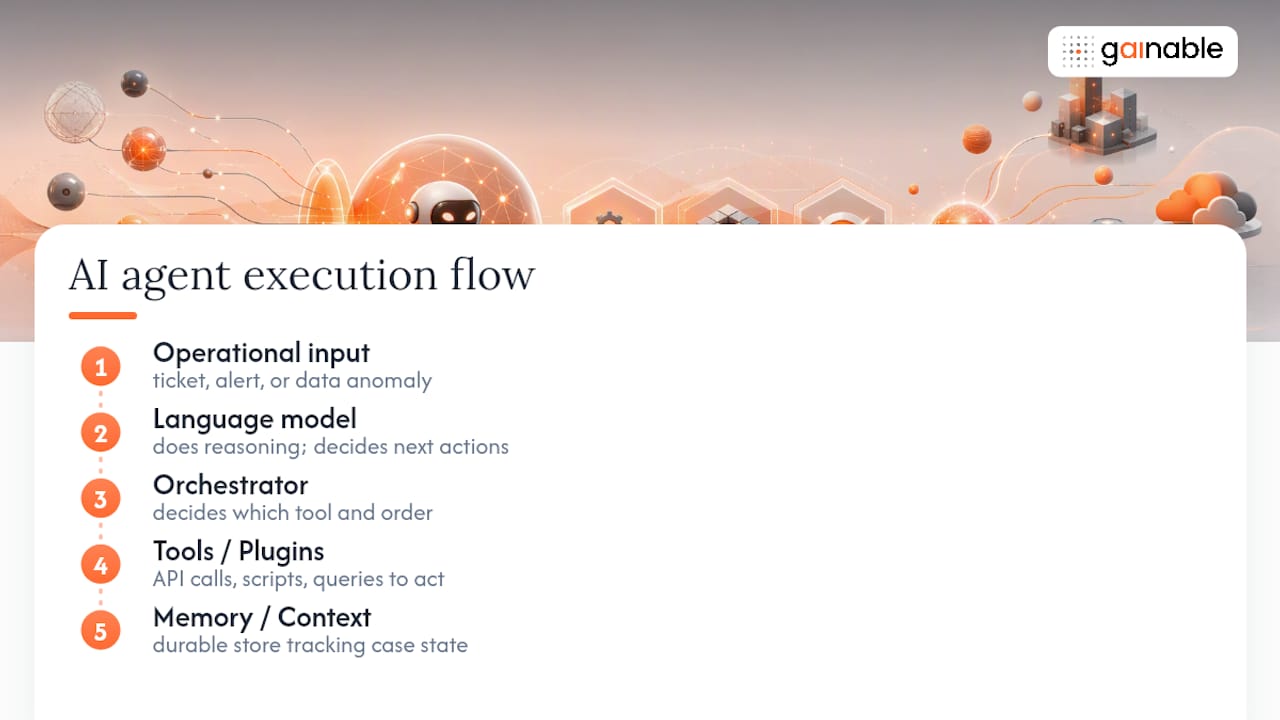
The model does the reasoning: given a ticket, an alert, or a data anomaly, it decides what needs to happen next. But the model alone can’t do anything, it can only suggest. Tools are what give it hands: an API call to update a record, a script to restart a service, a query to pull inventory levels. The orchestrator sits above both, deciding which tool to call, in what order, and when to hand control back to a person.
Memory is the piece people underestimate. Without a context store, an agent has no idea what it did five minutes ago, which makes it prone to repeating actions or contradicting its own prior decisions. A durable memory layer lets the agent track a case across multiple steps, escalations, and even system restarts, without losing the thread.
Connectors determine whether any of this touches your actual operation. Agents need to plug into your ERP, your spreadsheets, your IoT sensor feeds, and your monitoring stack, and that integration layer is usually where implementation time actually goes, not the model itself. A connected workspace that merges these sources into one data model removes a lot of that friction before an agent ever runs.
Three design patterns separate a safe rollout from a risky one. Bounded execution caps how long an agent can run and how many steps it can take before it must stop and report. Human-in-the-loop gates route any decision above a defined risk threshold to a person before it executes. Cost controls cap how many model calls or tool invocations an agent can rack up per task, so a bug doesn’t turn into a runaway bill. Skip any of these three and you’re not running an agent, you’re running an unsupervised script with better vocabulary.
AgentOps and Governance: Operating Agent Fleets Safely at Scale
Here’s the part most rollout plans skip, and it’s the part that determines whether your pilot survives contact with production. AgentOps treats agent deployment as a discipline, not a one-time setup task, and it breaks into four pillars: governance and security, build and operations, evaluation, and observability, according to guidance built around Amazon Bedrock AgentCore.
Think of it less like a checklist and more like the seatbelt laws that came after cars got faster. Speed without controls just means faster crashes.
- Version every agent like deployable code. Treat agent logic, prompts, and tool permissions as artifacts with version history, so you can roll back a bad update the same way you’d roll back a broken deploy.
- Build CI/CD pipelines for agents, not just for the apps they touch. Every change to an agent’s instructions or tool access should pass through testing before it reaches production data.
- Log four telemetry layers: what the agent perceived, what it decided, what action it took, and what the outcome was. Skipping any one of these turns your audit trail into a guess.
- Set human approval thresholds by risk, not by convenience. A price adjustment under $50 might auto-execute; a contract cancellation should always route to a person.
- Build a default-deny matrix. An agent should need explicit permission to touch a system or data type, not implicit permission because nobody said no.
- Cap cost per task and per day. Model calls and tool invocations both cost money, and an agent stuck in a reasoning loop can burn through a budget in hours.
- Fail closed, not open. If an agent hits an error state, its default behavior should be to stop and escalate, never to guess and proceed.
Runtime patterns matter here too. Treating agents as manifest-based, versioned artifacts with durable leases prevents the ugly failure mode where a restart causes an agent to double-execute a task it already finished, a pattern documented in AgenticOps runtime guidance. An append-only operational audit log, not a mutable status field, gives you the traceability to reconstruct exactly what happened when something goes wrong.
Pro Tip: Set your approval thresholds before your first pilot, not after an agent does something you didn’t expect. Retrofitting governance onto a live agent is a much harder conversation than building it in from the start.
How to Evaluate and Pilot AI Agents for Operations
Skip the temptation to pilot everywhere at once. Pick one workflow, define what success looks like in numbers, and give the pilot a hard timebox before you decide whether to scale it.
Start with KPIs that are specific to the workflow you’re automating, not generic “efficiency” metrics that don’t map to anything measurable:
- Time saved per task or case, measured against your current manual baseline, not an estimate.
- Mean time to resolution (MTTR) for incident-response or service-desk agents.
- On-time-in-full (OTIF) rate for supply chain and scheduling agents.
- Error reduction rate, comparing agent-flagged issues against what your existing QA process would have caught.
- Throughput gains, meaning cases or units processed per hour without added headcount.
Pilot design matters more than model choice. Narrow the scope to one workflow with clean, well-documented inputs, what some practitioners call gold-standard data, because an agent trained or prompted against messy inputs will just reproduce that mess faster. Define your success gate up front: a specific accuracy or time-saved threshold the pilot must clear before you scale it, and a rollback rule for what happens if it doesn’t. Academic testing of multi-agent orchestration with structured SOPs reported end-to-end accuracy between 85% and 97%, with case resolution time dropping from roughly 30 minutes to 5 in some categories, a useful benchmark for what a well-groomed pilot can realistically achieve.
Cost drivers break into three buckets: model call volume (which scales with task complexity and how often the agent needs to reason), integration and connector work (usually the biggest line item), and engineering time spent on testing and guardrails. ROI reporting from platforms and case studies varies widely, and results depend heavily on data readiness and scope, so treat any vendor’s headline ROI number as a starting hypothesis, not a guarantee for your environment. Verizon’s reported sales lift from AI customer-service agents is a real example of commercial impact, but it came after a scoped deployment with defined success criteria, not a blanket rollout.
Implementation Checklist and Common Pitfalls
A pilot fails less often because the model was wrong and more often because the groundwork was skipped. Work through these steps in order:
- Run discovery on your data. Map where your operational data actually lives, spreadsheets, ERP tables, ticketing systems, and check whether it’s current enough to act on.
- Groom your SOPs before you groom your agent. Convert ambiguous, tribal-knowledge procedures into structured, step-by-step specs. SOP grooming measurably improves execution accuracy and consistency once agents start running against those specs.
- Run a sandboxed trial against historical data, not live systems, to catch obvious failure modes before anything touches production.
- Move to a supervised pilot with a human reviewing every action for the first several weeks, then thinning that review down as confidence builds.
- Scale gradually, workflow by workflow, rather than flipping every eligible process over at once.
The pitfalls that sink most rollouts are predictable. Ambiguous SOPs produce inconsistent agent behavior, because an agent can’t follow a procedure that was never written down clearly. Missing telemetry means you find out about a failure from a customer complaint instead of a dashboard. Cost runaway happens when nobody set a ceiling on model calls. And a lack of approval policy turns every edge case into an improvised decision made by software with no one watching.
The mitigations mirror the pitfalls directly: groom SOPs into structured specs before automation starts, bound every agent’s execution with timeouts and step limits, build an escalation matrix that routes ambiguous cases to a named person, and schedule periodic re-evaluations rather than assuming a pilot that passed once stays accurate forever.
Pro Tip: Re-run your evaluation gate every quarter, not just at launch.
Where a Sheets-to-App Platform Changes the Pilot Math
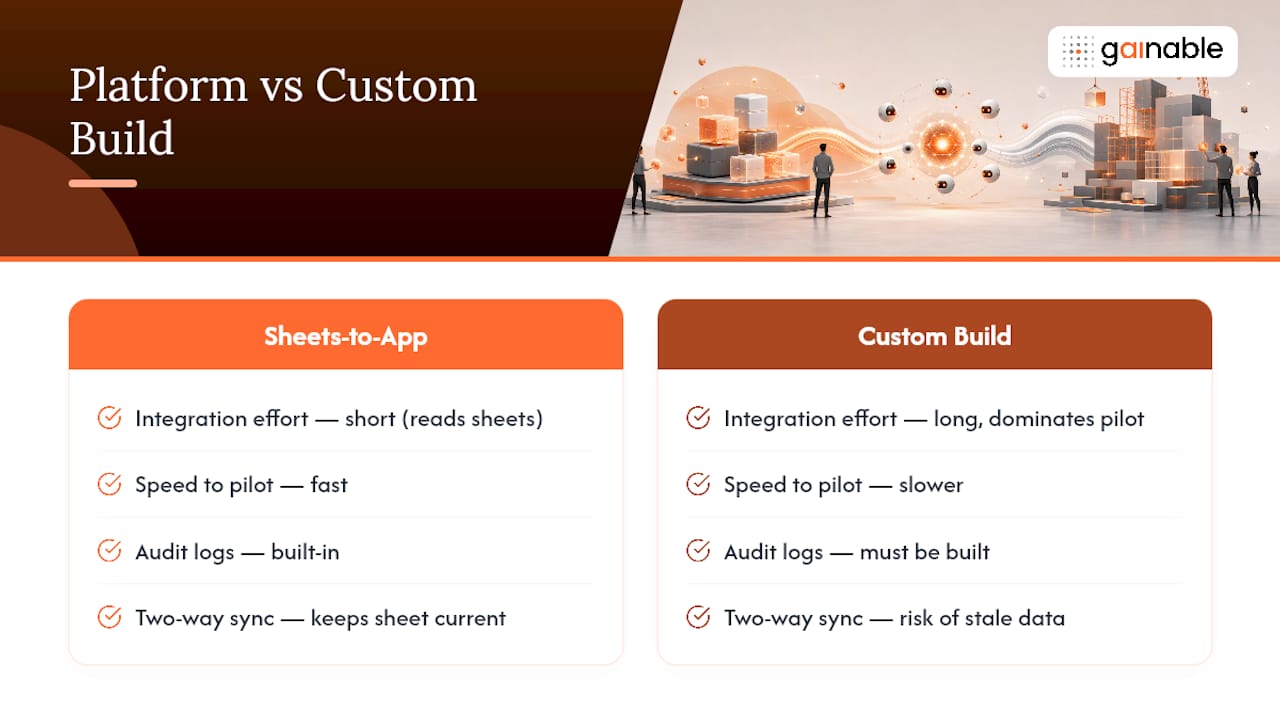
Most of the time lost in an agent pilot goes to integration, not model selection. Gainable shortens that path by reading your spreadsheets, whether Excel, Google Sheets, or both, and generating a working app directly from the structure already in your columns, then syncing both ways with tools like HubSpot, Stripe, Airtable, Salesforce, Jira, and Linear.
Gaia Autopilot runs on top of that connected data: it watches for anomalies, drafts the action it thinks should happen, and waits for your approval before anything executes, the human-in-the-loop pattern that responsible agent rollouts require. For teams choosing between a custom build and a platform, the case for acceleration comes down to speed to pilot, built-in audit logs, and two-way sync that keeps your original spreadsheet current instead of stale.
Start Piloting Agents Without the Integration Slog
Gainable gets you to a working pilot faster than a custom build, because the app comes from the data structure you already have, not a blank canvas someone has to design from scratch.
Point the platform at your maintenance logs, your scheduling sheet, or your ticket queue, and it merges that data into one model with authentication, dashboards, and audit logs already built in. Layer Gaia Autopilot on top and you get an agent that drafts the action, whether it’s a reorder recommendation or a schedule adjustment, and waits for a person to approve it before anything ships. Connect it to HubSpot, Stripe, or Salesforce and the sync runs both directions, so your source spreadsheet never goes stale while the app stays live. If your team is scoping a pilot with a defined KPI and a rollback rule already in mind, start a trial and see how fast the same workflow runs once it’s built from the data you already track.
Sources
- AgentOps: Operationalize agentic AI at scale with Amazon Bedrock AgentCore
- Agent-Ops: A Multi-Agent Orchestration Framework for End-to-End SOP Automation in E-Commerce Operations
- AI in operations management (IBM)