

TL;DR
- Thousands of managers at large companies build their own data tools because the official ones don't serve how their team works day to day.
- This is rational behavior, not rogue IT. The company's dashboards are built for the org, not for you.
- The risk is building on a fragile foundation: a Google Sheet with no access controls, no audit trail, no connection to live data.
- You can build the same tool properly, connected to live data, with role-based access, an audit trail, and no IT involvement required.
You built the better version already
The company bought a dashboard. A real one. Named vendors, executive sign-off, IT implementation, the works.
It launched. It was supposed to do everything.
Six months later, you're still exporting from the old system every morning, reformatting it in Excel, and distributing it to your team because the official dashboard is either wrong, stale, or doesn't show the specific slice of data your team needs.
You are not alone. This is one of the most common patterns in operations, insurance, logistics, sales, and warehouse management: the manager who built a better tool than the company's official one and uses it quietly, every day.
One insurance manager at a 35,000-person company described the moment he built his own version: "I created it before they said I couldn't. So I just assume I'm grandfathered in."
His team of 40 uses it every day. The company still has the broken dashboard. He never told anyone.
Why this keeps happening
It's not that enterprise software is bad. It's that enterprise software is optimized for the company's reporting needs, not for the team-level operational workflow that drives daily decisions.
Salesforce is optimized for the VP of Sales' pipeline review, not for the 10 adjusters on your floor who need to know which claims need attention today. Power BI is optimized for the executive dashboard, not for the format your team can read at a glance on a Tuesday morning.
So you fill the gap. You connect to the data you have access to, build a view that matches how your team works, and distribute it. You're not circumventing the system. You're completing it.
The problem is how you've been filling the gap: a spreadsheet, shared via a link, that only you can maintain.
The four failure modes of the informal data tool
1. It's fragile. One accidental click in the wrong cell and the formula chain breaks. One person opens it on mobile and shifts a row. The file your team's morning depends on is one accident away from being wrong.
2. It's undocumented. You know how it works. Your team knows it works. Nobody else does. If you left tomorrow, the tool disappears with you.
3. It has no access control. Everyone with the link can see everything and change everything. Your 40 adjusters are one typo away from corrupting the file you built.
4. It's frozen in time. The data is as fresh as the last time you manually exported and refreshed it. If you don't touch it by 8am, your team is working with yesterday's numbers.
These are not reasons to stop building informal tools. They're reasons to build them properly.
What "properly" looks like
A properly built team data tool has four properties the spreadsheet version doesn't.
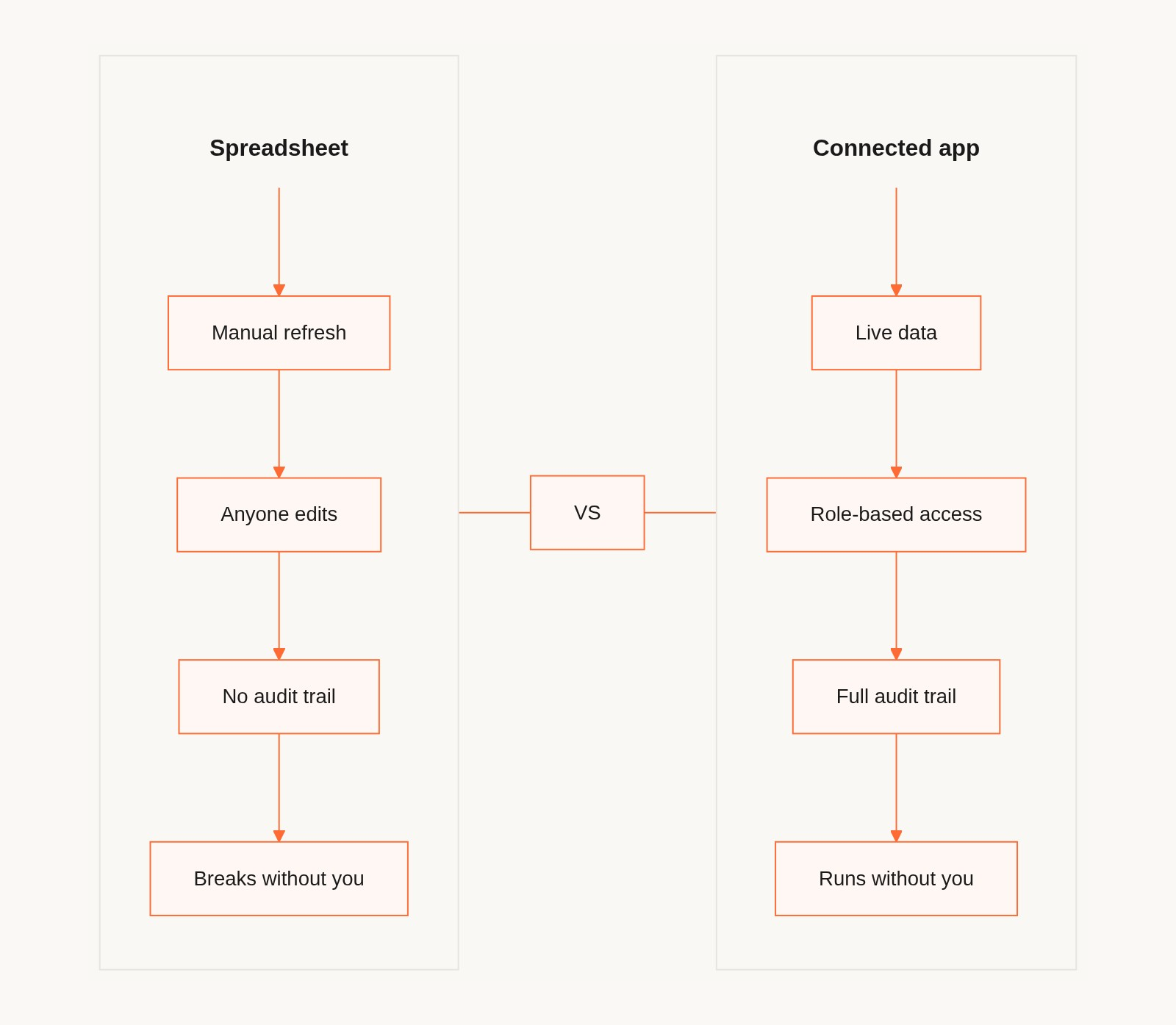
Live connection to your data source. When your source system updates, the app updates. You stop being the manual refresh button. Your team always has current data.
Role-based access. You decide who can see what and who can change what. Your team members have viewer or editor access scoped to the data they're responsible for. Nobody can touch data that isn't theirs.
An audit trail. Every change is timestamped and attributed. When something looks wrong, you can see what changed, when, and who changed it. You have the history.
It runs without you. When you're out, the app keeps running. Your team can access what they need. The process is no longer a single point of failure.
The tool you built in a spreadsheet already solves the core problem of getting useful data to your team in a format they can use. These four properties just make it reliable enough to depend on.
How to build it without IT
The practical constraint is that you can't wait for IT and you can't ask for budget approval every time your team needs something.
Tools like Gainable exist for exactly this scenario. You connect your existing data sources, the same Salesforce account you already access, your own Google Sheets, your HubSpot, your Stripe data, and Gaia reads the data and builds an app from it. You don't configure the app. You don't design it. You answer two or three questions, and a working app with dashboards, views, and role-based access is ready to publish.
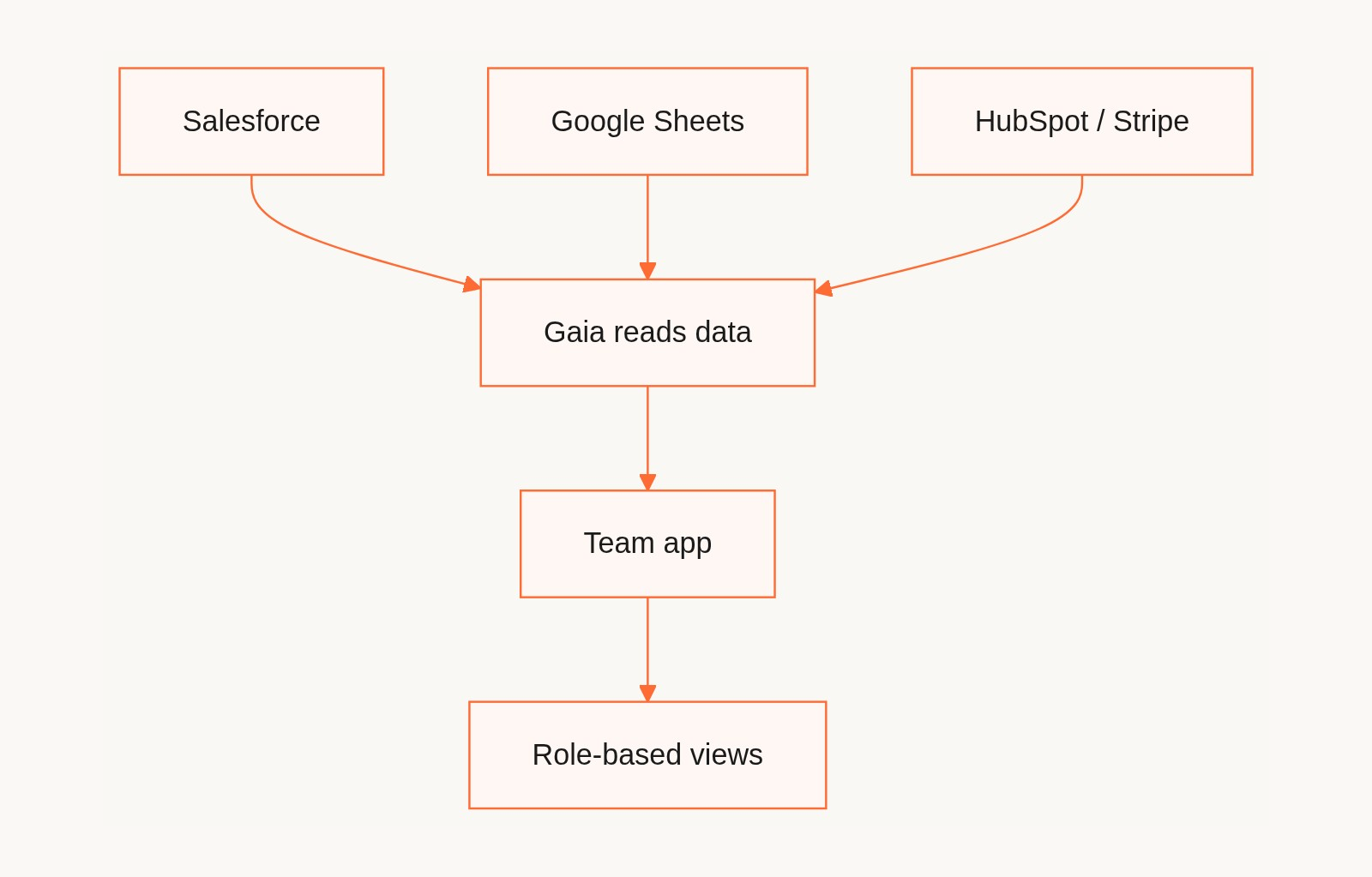
The IT conversation you don't have to have:
You're not creating a new database, modifying any source system, or adding a new data feed. You're connecting to data you already have legitimate access to and building a view of it for people who already have access to the same data.
The compliance footprint is the same as sharing a Google Sheet with your team, except it's more secure, because role-based access means nobody can accidentally overwrite the underlying data.
The one exception: if your company handles regulated data (PHI under HIPAA, financial data under SOX, personal data under GDPR), verify that the tool you choose meets the relevant compliance requirements before connecting. For most operational data in mid-market companies, including claims data, inventory data, sales pipeline data, and warehouse operations, this is a self-service decision.
What happens when you get found out
In most cases: nothing. Because your tool works and the company's doesn't.
The more likely outcome is that your manager asks why your team's numbers are always accurate and whether other teams could use the same setup. This is a pattern that shows up across industries: the manager who built the shadow tool quietly, it works, and now three other teams want access.
Expansion in this model is not top-down. It's parallel discovery, where multiple managers at the same company independently arrive at the same approach because they all have the same problem. The manager in insurance puts 40 adjusters on it. An operations manager on a different floor hears about it and builds their own. Nobody announces it at an all-hands. It spreads because the problem is universal.
This is why the tool has to be built properly from the start. You're not just building for your 40 people. You're potentially building the template that three other teams adopt.
What the build looks like in practice
For an insurance claims manager with 40 adjusters:
You have SAS data that dumps nightly, a company dashboard that's usually wrong, and a Google Sheet you export into and distribute every morning. The build:
- Connect the Google Sheet (or the SAS export, if it can be automated) as the data source.
- Gaia reads the claims data: adjuster names, claim types, statuses, dates, amounts.
- The app is built: a list view of all open claims, a per-adjuster filtered view, a management dashboard showing team totals.
- You set up roles: adjusters get their own view, supervisors get the full view, you get admin.
- You publish and share the link with your 40 people.
The morning export becomes optional. Your team has the data. The management dashboard shows what it needs to show without anyone building it manually.
For a sales manager with a Salesforce account:
Salesforce shows everything. What you need is the 12 accounts that need attention this week in the format your team can scan in two minutes. The build:
- Connect your Salesforce account.
- The app is built around your deal data: pipeline view, owner-filtered views, activity flags.
- You refine: "surface deals with no activity in 14 days at the top," "add a next step field I can edit," "give each rep a view of only their accounts."
- Gaia Autopilot watches for stalled deals and drafts follow-up messages for your review each morning.
You didn't replace Salesforce. You built the team-facing layer on top of it that Salesforce doesn't give you natively.
FAQ
Q: Is this allowed? Can I connect company data to a third-party tool without IT approval?
In most mid-market companies, connecting your own Salesforce account or Google Sheets to a business tool is within your authority as the account holder. It's no different from connecting Zapier, Slack, or any other SaaS integration to your Salesforce. If your company has a data classification policy that prohibits third-party connections to specific data types, follow it. For most operational data (claims, inventory, pipeline, warehouse ops), this is a self-service decision.
Q: What if IT shuts it down?
If they have a valid compliance reason, you respect that and find an approved alternative. In practice, IT rarely shuts down a working tool that your team depends on and that improves on the official one. The more likely outcome is that IT endorses it retroactively or adopts it for other teams.
Q: How is this different from just using a better spreadsheet?
A spreadsheet is a file. It has no access controls, no live data connection, no audit trail, and no API. It stops working when you stop maintaining it. A connected team app has all four of those properties and keeps working without you in the loop.
Q: My team has been using my spreadsheet for two years and it works fine. Why change it?
Fine is not the same as reliable. The question is what happens the next time someone opens it on mobile and shifts a row, when you're out sick for a week, or when you leave the company. The app version gives your team the same data with less fragility, and the upgrade is worth the 15 minutes it takes to build.
Q: What if I want IT to take this over later?
Gainable is built around standard data connections and a structured app layer that IT can review and understand. If the tool grows to the point where IT wants to formalize it, the handoff is straightforward. You're not building something proprietary and unmaintainable. You're building a documented, connected app.
The point
You didn't build your shadow tool because you wanted to circumvent IT. You built it because the gap between your company's data systems and your team's daily needs was real, and you were the one with the skills and the motivation to close it.
You were right to build it. The question is just whether you want to build the version that's one accident away from breaking, or the version that runs reliably whether you're there or not.
The data is already there. The connections are already there. All that's missing is the 15 minutes it takes to build the proper version.