

Multi-source data applications are defined as systems that pull data from two or more external sources, normalize it to a shared internal schema, and expose it through a unified interface for analysis or automation. The industry term for this architecture is “multi-source data integration,” and understanding it is the difference between a prototype that works on a demo and a production system that holds up under real load. The core sequence is extraction, normalization, aggregation, and access. Get that order wrong and you will spend months rebuilding. This guide breaks down each stage, explains federated querying, covers the operational challenges teams consistently underestimate, and shows how the architecture translates into real workflow gains.
How multi-source data apps work: the core architecture
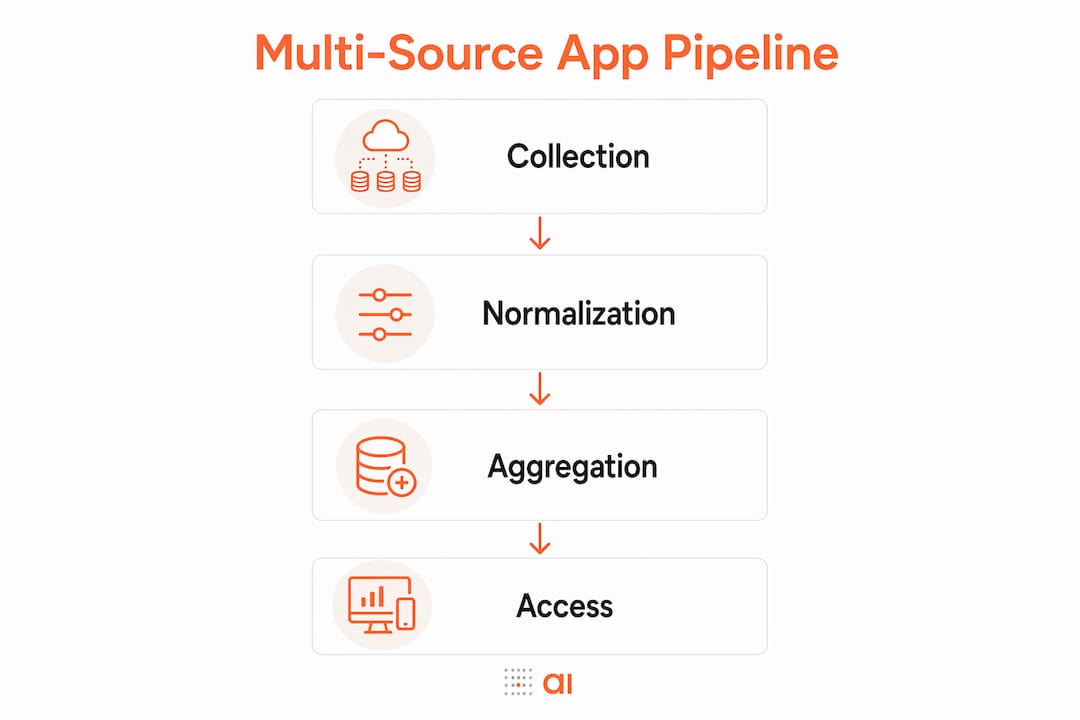
Multi-source data apps follow a strict four-stage pipeline. Building these apps requires defining a canonical internal data model before writing a single line of integration code. That canonical model is the shared language every source must speak before its data enters your system.
The four stages are collection, normalization, aggregation, and access. Each stage has a specific job, and skipping or reordering them creates compounding problems downstream.

| Stage | What happens | Common failure |
|---|---|---|
| Collection / Extraction | Pull raw data via APIs, file imports, CDC, or streams | Inconsistent polling intervals causing data gaps |
| Normalization | Map source fields to the canonical schema using adapters | Mismatched field types silently corrupting records |
| Aggregation | Compute sums, averages, counts on normalized data | Aggregating too early, losing granular records |
| Loading / Access | Expose data via REST, GraphQL, or dashboards | Unstable schema breaking downstream analytics |
Modern integration methods blend ETL, ELT, change data capture (CDC), and streaming depending on source type and latency requirements. A CRM like HubSpot might use REST API polling, while a transactional database uses CDC to capture row-level changes in near real time. Choosing the wrong method for a source type creates latency mismatches that corrupt time-sensitive reports.
Normalization adapters are the unsung workhorses of this architecture. Each adapter maps one source’s raw output to the canonical model. A “customer” record in Stripe and a “contact” record in HubSpot describe the same entity but use different field names, data types, and ID formats. The adapter resolves those differences before the data touches your core schema.
Pro Tip: Define your canonical model on paper before connecting a single source. Every field you add to the model after integration begins forces you to rewrite existing adapters. Front-loading that design work saves weeks.
Premature aggregation is the most common architectural mistake teams make. Aggregating before normalization locks you into a fixed summary view. You lose the ability to slice data by dimensions you did not anticipate at build time. Keep atomic records intact through normalization, then aggregate only at the access layer or in dedicated reporting queries.
How does federated querying enable real-time multi-source access?
Data virtualization is an alternative to physical integration. Instead of copying data into a central store, a virtualization layer routes queries to each source at runtime and assembles the results. Tools like Microsoft’s Data API Builder support multi-source configurations that expose a single REST or GraphQL endpoint, routing federated queries across databases without moving the underlying data.
The virtualization engine receives a query, breaks it into sub-queries for each relevant source, pushes filtering conditions down to the source (a technique called predicate pushdown), and assembles the response. Predicate pushdown is critical for performance. Without it, the engine pulls full datasets from every source and filters in memory, which destroys response times at scale.
| Approach | Data movement | Latency | Best for |
|---|---|---|---|
| Physical integration (warehouse) | Data copied to central store | Higher initial load, fast queries | Historical analysis, large-scale reporting |
| Data virtualization / federation | No data movement | Query-time latency per source | Real-time access, reducing data duplication |
Namespace governance is a non-obvious requirement that catches teams off guard. Federated API engines throw startup errors when two sources expose entities with the same name. Every entity, REST path, and GraphQL type must be unique across the entire configuration. Teams managing dozens of sources need a naming convention established before onboarding source two.
Virtualization has real limits. It depends on each source being available and responsive at query time. A slow or unavailable source blocks the entire federated response. Physical integration, by contrast, serves queries from a local store even when upstream sources are down. The right choice depends on your tolerance for query-time source failures versus the operational cost of maintaining data pipelines.
What are the biggest challenges in multi-source data management?
Integration is portfolio management, not a single engineering task. Teams managing more than 100 sources classify feeds by type: SaaS APIs, relational databases, flat files, CDC streams, and reverse syncs. Each category carries different reliability profiles, schema change frequencies, and governance requirements. Treating each integration as a one-off project is the fastest path to an unmaintainable system.
Schema drift is the most persistent operational challenge. A SaaS vendor updates their API and renames a field. Your normalization adapter silently maps the old field name and returns null for every new record. Without validation at the ingestion layer, that null propagates into your canonical model and corrupts downstream reports before anyone notices.
The best practices for managing these challenges are:
- Validate at ingestion. Check incoming data against expected schema before normalization runs. Reject or quarantine records that fail validation rather than letting bad data enter the canonical model.
- Build per-source error handling. Each integration has its own rate limits, timeout behavior, and failure modes. Generic error handling misses source-specific edge cases that only appear in production.
- Classify sources with a taxonomy. Label each source by type, criticality, and owner. This makes it possible to prioritize incident response and apply the right governance rules per category.
- Monitor with confidence signals. Surface data freshness, record counts, and validation pass rates as metrics. A drop in record volume from one source is often the first signal of an upstream schema change.
- Document ownership. Every source integration needs a named owner who receives alerts and approves schema changes. Ownerless integrations accumulate technical debt silently.
Pro Tip: Treat your source classification taxonomy as a living document. Add a new row for every source you onboard, including its failure mode, retry policy, and escalation contact. That catalog becomes your incident runbook.
Error handling across heterogeneous sources is the most common gap between a working prototype and a production-ready app. A prototype connects to two sources under ideal conditions. Production connects to a dozen sources, each with its own failure behavior, and your app must degrade gracefully when any one of them misbehaves.
What practical benefits do multi-source apps deliver for teams?
Validated, normalized data powers AI logic, automated routing, and export-ready outputs that connect to external systems. That is the payoff for getting the architecture right. Here is what that looks like in practice for data analysts and team leads:
- Automated workflow routing. When a deal closes in your CRM, a normalized event triggers invoice creation in your billing system and a task assignment in your project tool. No manual handoff, no data re-entry.
- Enriched analytics. Combining sales data from a CRM with payment data from Stripe and support tickets from a helpdesk gives you a complete customer health score that no single source could produce alone.
- Live operational dashboards. A warehouse team sees inventory levels, open purchase orders, and supplier lead times in one view, pulled from three separate systems and normalized to a shared schema.
- AI-assisted decision support. Normalized data with consistent field types and validated records is the prerequisite for any reliable AI model. Inconsistent source data produces unreliable model outputs.
- Export-ready reporting. Integrated data with a stable schema generates reports that external partners and auditors can consume directly, without manual reformatting.
The multi-source data management approach also enables cross-functional apps. A sales team lead can build a pipeline view that pulls contact data from HubSpot, payment history from Stripe, and support status from a helpdesk, all in one interface. That kind of cross-functional visibility used to require a dedicated data engineering team. Modern integration platforms make it accessible to analysts and team leads directly.
Gainable’s operations app builder demonstrates this pattern. Teams connect their existing data sources, and the platform generates an app that reflects their actual workflow, without custom code. The result is faster deployment and less time spent on manual data reconciliation.
Key Takeaways
Multi-source data apps succeed when teams define a canonical internal model first, enforce normalization before aggregation, and treat integration as an ongoing portfolio management discipline rather than a one-time build.
| Point | Details |
|---|---|
| Define the canonical model first | Design your shared internal schema before connecting any source to avoid costly adapter rewrites. |
| Normalize before you aggregate | Keep atomic records intact through normalization so you retain flexibility for ad-hoc analysis later. |
| Treat integration as portfolio management | Classify every source by type, owner, and failure mode to maintain governance at scale. |
| Validate at ingestion | Reject or quarantine records that fail schema checks before they enter your canonical model. |
| Choose virtualization deliberately | Federated querying suits real-time access needs; physical integration suits high-volume historical analysis. |
Why architecture decisions made on day one define your app’s ceiling
I have watched more multi-source integration projects stall at the same point: the moment the team tries to add a fifth or sixth source to a system that was designed for two. The canonical model was never written down. The normalization adapters were written inline with the collection code. Aggregation happened at ingestion. The whole thing has to be rebuilt.
The teams that avoid this pattern share one habit. They spend the first week on paper, not on code. They define the canonical model, agree on field naming conventions, and write out the failure policy for each source type before a single API call is made. That week of design work saves three months of refactoring.
The other thing I have seen consistently underestimated is operational readiness. Integration code is maybe 40% of the work. The rest is monitoring, alerting, retry logic, schema drift detection, and documentation. A system that integrates five sources correctly but has no alerting on validation failures will silently serve bad data for weeks. Your downstream reports look fine until they do not, and by then the damage is done.
The good news is that tooling in 2026 has genuinely improved. Federated API engines handle namespace governance automatically. Platforms like Gainable auto-generate normalization adapters from your connected sources, which removes a significant portion of the manual adapter work. The architecture principles have not changed, but the time required to implement them correctly has dropped considerably.
— Rickard
How Gainable connects your data sources into working apps
Building a multi-source data app from scratch requires months of engineering work on adapters, schemas, and error handling. Gainable shortens that timeline significantly.
Gainable connects to sources like HubSpot, Stripe, and Google Sheets through its data connectors platform, normalizing incoming data to a shared internal model automatically. The app builder generates a working app from your live team data without requiring code. The Gaia Copilot AI assistant lets you refine the app through natural language queries, adjusting views and logic in real time. Teams that previously spent weeks on manual data reconciliation report deploying working operational apps in days. If your team is managing multiple data sources and still doing reconciliation by hand, Gainable is worth a close look.
FAQ
What is a canonical data model in multi-source integration?
A canonical data model is a shared internal schema that all source data is normalized to before storage or analysis. It eliminates field name conflicts and type mismatches across sources.
How does data aggregation work in a multi-source app?
Aggregation computes summaries like sums, averages, and counts from normalized atomic records. Best practice keeps aggregation as a downstream step so granular data remains available for ad-hoc queries.
What is the difference between data virtualization and a data warehouse?
Data virtualization queries sources at runtime without copying data, which suits real-time access. A data warehouse stores physical copies of integrated data, which suits high-volume historical analysis.
How do multi-source apps handle schema drift?
Production-ready apps validate incoming data against expected schemas at ingestion and quarantine records that fail. Monitoring record counts and validation pass rates surfaces drift before it corrupts downstream reports.
What makes multi-source data integration different from simple API calls?
Simple API calls retrieve data from one source. Multi-source integration normalizes data from many sources to a shared schema, handles per-source failures, and exposes a unified interface for analysis and automation.