

TL;DR
- Accounting teams routinely manage critical workflows like collections tracking, bank reconciliation, and AR oversight in spreadsheets that break when shared.
- The main failure modes: anyone with the link can overwrite data, notes live in Slack instead of on records, and the controller loses access when the file is locked.
- The fix is a team app built from your existing data sources, not another spreadsheet or an expensive ERP module.
- You can build it yourself in under 15 minutes using your existing Stripe, Shopify, PayPal, or bank data. No IT, no developer required.
The spreadsheet that everyone fears touching
Every accounting team has at least one.
It's usually the collections tracking sheet. Or the daily bank reconciliation file. Or the payment reconciliation workbook that pulls from six different PSPs. It lives on SharePoint or Google Drive, accessed via a shared link, and it is the single most important document in your department.
It's also extremely fragile.
Someone opens it on mobile and moves a row without realizing. A formula breaks when a new column gets added. A colleague updates the wrong field with the wrong value. By the time your controller opens it for a board meeting, the data no longer matches reality, and nobody knows when it changed.
This is not an edge case. It's the normal state for accounting teams who manage critical workflows in spreadsheets designed for single-user editing.
The five problems with a shared accounting spreadsheet
1. Access control doesn't exist.
Everyone with the link has the same permissions. Viewers and editors look the same. There's no way to give your controller read-only access without also giving your AR team read-only access, and then nobody can update it.
2. The conversation happens in the wrong place.
A line item is unclear. You send a Slack message. Your colleague is in a meeting. You get a reply three hours later. By then you've moved on, and the explanation lives in Slack where nobody will find it in six months. Notes that belong on the record end up scattered across email, Slack, text messages, and voicemails, where nobody can recover them.
3. You are the only person who can maintain it.
The formulas are yours. The structure is yours. The logic that makes it work is yours. When you're out, everything stops. One accounting manager in user research described it: "I go on vacation in December. That's it. That's all I get. Once a year." Leaving means the process breaks.
4. There's no audit trail.
You can't see who changed what or when. When a number looks wrong, you have no history to trace it. Version history in Google Sheets helps partially, but it doesn't tell you why something changed, and it doesn't connect to the context around the decision.
5. The note field in your ERP is the size of a remote control.
Sage's note field fits about 30 characters. QuickBooks's memo line is similarly limited. So the context for every account, the payment arrangement, the dispute, the reason for the credit, lives nowhere official. It lives in your head and in your Slack history.
What the accounting team app looks like
Instead of a spreadsheet your team can corrupt, you have a shared app where:
- Your AR team sees the accounts assigned to them, with all notes on the record
- Your controller has a read-only dashboard that shows exactly what they need for board meetings, live
- Your AP person and billing person have their own views, scoped to their work
- Every change is logged, every note is attached to the record it belongs to, and every decision has a timestamp
The collaboration moves from Slack and email onto the data itself. When your colleague writes a note about a payment arrangement, it lives on the account record, not in a Slack thread from six months ago that you'll never find.
And when you go on vacation, the app keeps working. Your team can access the data they need without calling you. The process doesn't live only in your head.
How to build it from your existing data sources
You do not need a developer, an IT ticket, or an expensive ERP upgrade.
With a tool like Gainable, you connect your existing payment and financial data sources: Stripe, Shopify, PayPal, bank CSV exports, Google Sheets, and Airtable. Gaia then reads the data and builds the app structure automatically.
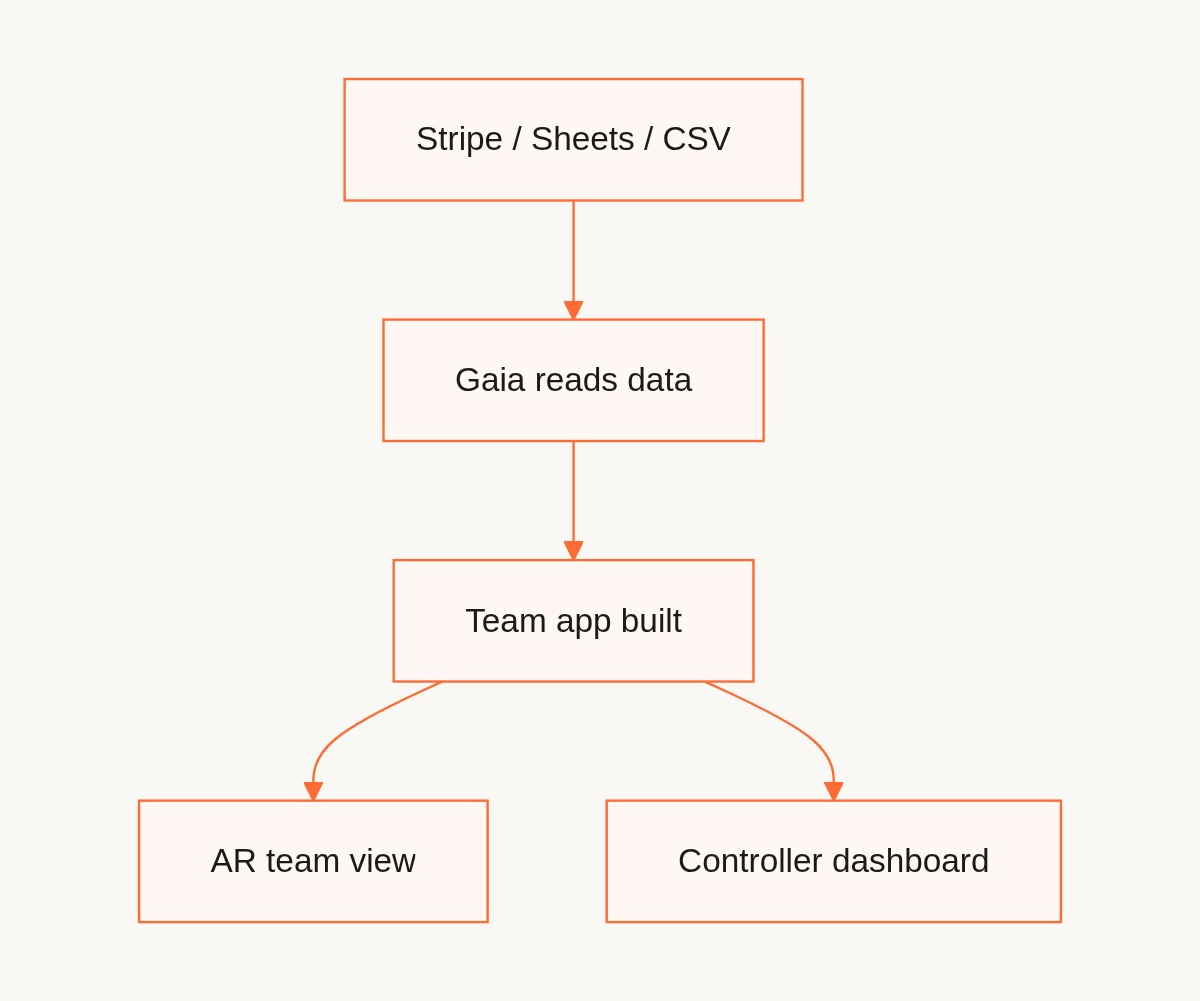
The process for a collections tracking app:
- Connect your data: your Stripe account, your accounts spreadsheet in Google Sheets, and any other PSP or bank export you currently work from.
- Gaia reads the data: field names, amounts, account identifiers, dates, status fields.
- It asks you two to three clarifying questions: do you want accounts grouped by status? Do you want an AR team view and a controller view separately?
- It builds the app: a list view of all accounts, detail pages for each account where you can add notes, a dashboard for your controller, role-based access controls.
- You refine in plain language: "add a column for the last contact date," "show overdue accounts at the top," "give the controller view-only access."
- Publish and share the link with your team.
Total time from connection to working app: under 15 minutes.
Supported data sources for accounting teams:
- Stripe (payments, subscriptions, invoices)
- Google Sheets (any existing spreadsheet you've built)
- Airtable (if you've already moved some data there)
- Typeform (if you collect payment info or client data through forms)
- Supabase (if your company has a database)
For bank feeds and ERP exports (Sage, QuickBooks), you can export as CSV and import directly into Gainable as a connected dataset. Two-way sync means you can write notes and status updates back to Google Sheets, keeping your existing records in sync.
The collections sheet use case in detail
This is the use case where the gap between "spreadsheet" and "team app" is most acute.
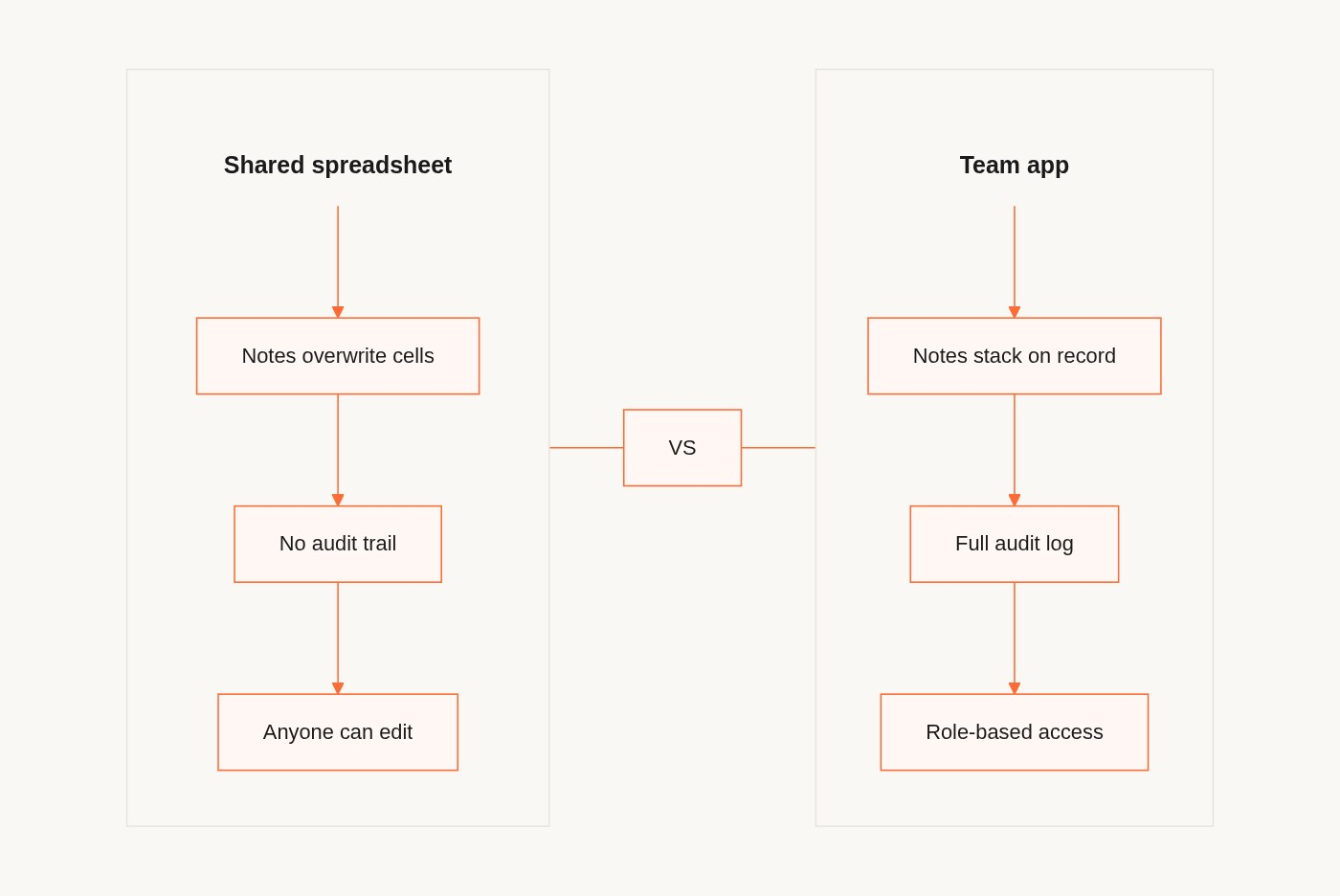
A typical collections tracking spreadsheet contains:
- Account name, balance, and days outstanding
- Payment arrangements and partial payment history
- Notes about disputes, promises to pay, and escalations
- Status (active, in arrangement, written off, sent to collections)
- Owner assignment (which AR person is managing this account)
In a shared spreadsheet:
- Notes are added to cells, overwriting previous notes
- Owner assignment is a text field anyone can change
- Status is a freeform field with no validation
- There is no way to see the history of changes to an account
- The controller cannot see the live data without opening the file, which means they might accidentally change something
In a team app built from the same data:
- Notes are timestamped and attributed to the person who wrote them, stacked chronologically on the account record
- Owner assignment is a dropdown with your team's names as options
- Status is a dropdown with validated values
- Every change has a timestamp and a user attribution in the audit log
- The controller has a read-only view of the dashboard without opening the underlying data
- Your AR team sees only the accounts assigned to them
Same data. Completely different experience for your team and your controller.
Where bank reconciliation fits in
The daily bank reconciliation is a different workflow but the same structural problem: you're the only person who runs it, the output is a spreadsheet that you either email or share via a link, and the process is entirely dependent on you.
For reconciliation automation specifically, matching transactions, flagging exceptions, running rules-based matches, there are dedicated reconciliation tools (Reconcilio, Rima, and CleverBalance are purpose-built for this). Gainable is the right tool for the downstream step: once the reconciliation is done, surfacing the results to your controller, flagging exceptions that need attention, and giving your team a live view of where things stand.
In practice, many accounting teams use both: a reconciliation tool for the matching logic, and a team app for the ongoing tracking, notes, and collaboration around the results.
The conversation with IT you won't need to have
For most accounting team apps built in Gainable, you do not need IT approval.
You are connecting to data sources you already have access to: your own Stripe account, your own Google Sheet, your own export from Sage. You're not creating a new data repository or modifying your ERP. You're building a view of data that already exists and sharing it with people who already have access to that data.
This is the same legal and compliance footprint as sharing a Google Sheet with your team, except it's more secure (role-based access, no one can accidentally corrupt the data) and more useful (live connection, notes on records, audit trail).
If your company has strict data residency requirements or handles PII covered by HIPAA or GDPR, you'll want to verify that Gainable's data handling meets your requirements before connecting. But for most accounting teams at 50 to 1,000 person companies, this is a self-service decision.
FAQ
Q: What accounting data sources does Gainable connect to?
Gainable natively connects to Stripe, Google Sheets, Airtable, Typeform, and Supabase. For ERP systems like Sage or QuickBooks, you can export as CSV and import that as a connected dataset. HubSpot and Salesforce are also supported if your collections workflow intersects with your CRM.
Q: Can I replace my ERP with a tool like this?
No, and you shouldn't try. Your ERP handles transaction processing, ledger maintenance, and compliance functions that require purpose-built accounting software. Gainable replaces the spreadsheet layer you've built on top of your ERP, not the ERP itself. Think of it as the team-facing app that sits between your accounting systems and the people who need to act on the data.
Q: How do I keep my data secure if I'm sharing it with a team app?
Gainable uses role-based access controls. You assign each team member a role (admin, editor, or viewer), and their access is scoped accordingly. Your controller gets view-only. Your AR team gets edit access on the accounts they own. Nobody gets access to data outside their scope.
Q: What if I need to make changes to the app later?
You make changes in plain language: "add a field for the next follow-up date," "show accounts over 90 days in a separate view," "remove the internal notes from the controller's dashboard." No code, no configuration interface. Changes take seconds and don't break existing data.
Q: How does this handle month-end close?
The app updates in real time as your connected data sources update. For month-end, your controller always has the live state of the data, not a snapshot from the last time you remembered to update the file. Gaia Autopilot can also draft a weekly or monthly summary of account status, overdue balances, and exception flags for your controller's review.
Getting started
The fastest way to test this for your team is to connect one data source, your collections tracking spreadsheet in Google Sheets, or your Stripe account, and see what Gainable builds from it. The build is free to try and takes under 15 minutes.
The collections sheet is usually the right place to start, because the pain is the most acute and the value is immediately visible to your team and your controller. See how Gainable works for accounting teams, or compare Gainable with the other tools you're evaluating.