

A custom CRM is a sales and customer management system tailored to your exact workflow, and you can build one today without writing a single line of code. No-code platforms like monday.com, Softr, Bubble, and Stackby have made it possible for entrepreneurs and business leaders to create fully functional CRM tools in days rather than months. The no-code CRM movement, also called citizen development, puts the power of custom software directly in your hands. This guide walks you through every phase: from choosing the right platform to modeling your data, configuring pipelines, automating workflows, and rolling out to your team.
What do you need before you build a custom CRM without developers?
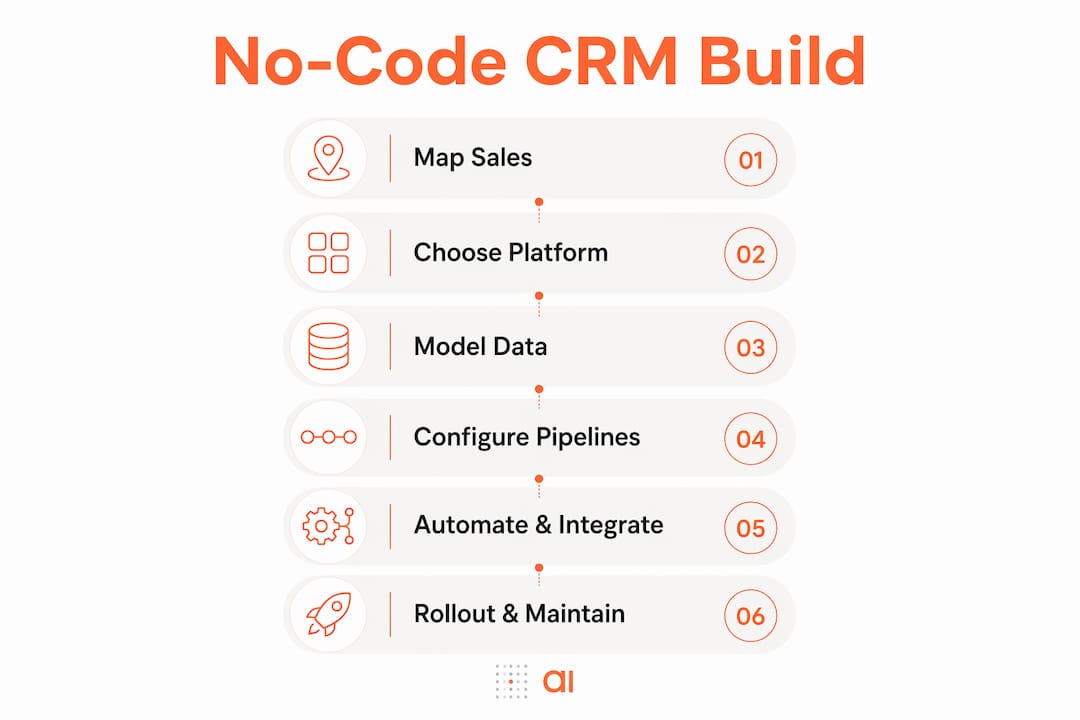
The biggest mistake most business leaders make is opening a no-code platform and starting to click before they have defined their sales process. Your CRM is only as good as the thinking behind it. Before you touch any tool, you need clarity on three things: how your customers move from lead to close, what data you need to track at each stage, and which platform fits your workflow.
Mapping your sales process first
Write out your customer journey in plain language. Identify every touchpoint: first contact, qualification, proposal, negotiation, and close. Then list the data you need at each stage. Contacts, companies, deals, and activities are the four core entities in almost every CRM. If you skip this step, you will spend hours rebuilding tables and automations later.
Choosing the right no-code CRM platform
Each platform has a different strength. Here is a quick comparison to help you decide:
| Platform | Best for | Key strength |
|---|---|---|
| monday.com | Sales teams wanting fast setup | Visual pipeline boards and built-in automations |
| Softr | Client portals and external-facing CRMs | Connects to Airtable; publishes immediately with authentication |
| Bubble | Complex CRM apps with custom UI | Full contact-company relationships and backend workflows without coding |
| Stackby | Spreadsheet-style CRM builders | Familiar grid interface with database power |

Once you pick a platform, gather your branding assets, set up your account, and prepare a sample dataset of at least 20 to 30 real contacts. Working with real data from day one exposes gaps in your process before they become problems.
Pro Tip: Check whether your platform supports role-based permissions before you commit. If your sales reps should not see each other's deals, you need that feature from the start, not as an afterthought.
The no-code app builders available in 2026 cover the full range from simple contact databases to multi-stage pipeline tools with AI-powered suggestions. Match the platform to your actual complexity, not to the most impressive demo you saw.
How do you model your data and configure pipelines visually?
Data modeling is the foundation of every reliable CRM. Starting with data models before building any screens prevents "data drift," which is the costly problem of workflows and reports referencing inconsistent or missing fields. Think of your data model as the skeleton. Everything else, the UI, the automations, the dashboards, hangs off it.
Core CRM entities and their relationships
Every no-code CRM needs at least these five entity types:
| Entity | What it stores | Key relationships |
|---|---|---|
| Contacts | Individual people | Linked to Companies, Deals, Activities |
| Companies | Organizations | Linked to Contacts, Deals |
| Deals | Revenue opportunities | Linked to Contacts, Companies, Pipeline stages |
| Activities | Calls, emails, meetings | Linked to Contacts, Deals |
| Pipelines | Stage-based deal progression | Contains Deals; drives workflow triggers |
Build these tables first and link them using your platform's relationship fields. In Bubble, you create data types with linked fields. In Airtable, you use linked record columns. In monday.com, you connect boards with mirror columns. The specific method differs, but the logic is identical across all platforms.
Configuring pipeline stages with visual builders
Once your tables exist, map your pipeline stages to the deal lifecycle you defined earlier. Typical stages include New Lead, Qualified, Proposal Sent, Negotiation, and Closed Won or Closed Lost. Drag-and-drop visual builders let you create these stages in minutes. Assign probability percentages to each stage so your dashboard can calculate weighted pipeline value automatically.
The 8-step no-code CRM framework from monday.com confirms that defining objects and pipeline stages first leads to stable workflows that visual builders can execute reliably. This is not just good practice. It is the difference between a CRM that scales and one you rebuild every six months.
Pro Tip: Lock your core data model after the first week of use. Adding fields is fine, but renaming or deleting core fields breaks automations and reports. Treat your schema like a contract with your future self.
You can also connect your data structures to a built-in database that keeps your records live and accessible across your whole team without manual syncing.
What are the best practices for automations and integrations without developers?
Automations are where a no-code CRM stops feeling like a spreadsheet and starts feeling like a real sales tool. The goal is to eliminate the repetitive tasks that eat your team's time: assigning new leads, sending follow-up reminders, updating deal stages, and notifying managers of stalled deals.
Here is how to approach automations without getting overwhelmed:
- Identify your top five repetitive tasks. Write them down before opening the automation builder. Common examples: assign a lead to a rep when it enters the pipeline, send a follow-up email three days after a proposal is sent, alert the manager when a deal has been inactive for seven days.
- Use trigger-action logic. Every no-code automation follows the same pattern: when X happens, do Y. In monday.com, Bubble, and Stackby, you configure this through a visual workflow designer with dropdown menus. No code required.
- Connect your existing tools. Integrating external data sources like Airtable, Google Calendar, or your email platform is often the most time-consuming step. Plan for it. Most platforms offer native connectors for Gmail, Outlook, Slack, and Zapier. For deeper integrations, tools like Make (formerly Integromat) handle multi-step workflows without any coding.
- Know the boundary. Most CRM needs (roughly 80 to 90 percent) are fully achievable with no-code admin tools. Developer involvement is only needed for server-side logic, complex APIs, or multi-step workflows that go beyond what declarative automation can handle. If you hit that wall, it is a narrow edge case, not the norm.
- Test before you launch. Run every automation with test data before your team touches the live system. A misfire that sends 200 emails to the wrong contacts on day one will destroy trust in the tool before it has a chance to prove itself.
Pro Tip: Test your integration flows end to end using a duplicate of your real dataset. This catches field-mapping errors and timing issues that only appear with actual data volumes, not toy examples.
Understanding why CRM integrations matter for your growth strategy helps you prioritize which connections to build first and which to defer until the system is stable.
How do you roll out and maintain your no-code CRM without developers?
Deployment is where many DIY CRM projects stall. The system looks great in testing, but adoption falls apart when real users encounter it. A phased rollout prevents this.
Start with these steps:
- Configure user roles and permissions first. Decide who can view, edit, and delete records. Sales reps typically get full access to their own deals and read access to shared contacts. Managers get full pipeline visibility. Admins control configuration.
- Run a pilot with two or three users. Choose your most engaged team members for the first two weeks. Their feedback will surface the 20 percent of issues that affect 80 percent of users.
- Train with real scenarios, not feature tours. Walk your team through their actual daily tasks inside the CRM. "Here is how you log a call" beats "here is the activities module" every time.
- Start simple, then layer in complexity. Implementing dashboards for deal pipeline value, conversion rates, and activity metrics is most effective when added after your team is comfortable with basic data entry. Overwhelming users with features on day one is the fastest way to get them back to spreadsheets.
- Schedule a monthly review. Set a recurring 30-minute meeting to review what is working, what is broken, and what new automations would save time. No-code platforms are designed for iteration. Use that advantage.
Common pitfalls to avoid as you scale:
- Adding too many custom fields before you know you need them
- Skipping documentation of your data model and automation logic
- Failing to archive or delete duplicate contact records early
- Ignoring mobile usability if your reps work in the field
The no-code CRM approach works best when you treat the system as a living tool, not a one-time project. Your sales process will evolve, and your CRM should evolve with it.
Key takeaways
Building a custom CRM without developers is fully achievable when you start with a stable data model, choose the right no-code platform, and roll out in phases with real user feedback.
| Point | Details |
|---|---|
| Data model first | Define contacts, companies, deals, and pipelines before building any screens or automations. |
| Platform selection matters | Match the tool to your complexity: monday.com for speed, Bubble for custom UI, Softr for client portals. |
| Automate the right tasks | Focus on the five most repetitive sales tasks and build trigger-action automations for each one. |
| Test before full rollout | Run all automations and integrations with real test data to catch errors before your team is affected. |
| Iterate after launch | Schedule monthly reviews to add features gradually and keep the system aligned with your actual process. |
Why I think most teams overcomplicate this from the start
After watching dozens of business leaders attempt to build their own CRM tools, the pattern is consistent. The ones who succeed spend the first day thinking, not clicking. The ones who struggle open the platform immediately and start building screens before they have defined a single data relationship.
No-code platforms have genuinely democratized CRM customization. What used to require a developer, a project manager, and six weeks of sprints now takes a focused founder and a long weekend. That is a real shift. But the freedom these tools offer also makes it easy to build something that looks functional and falls apart under real use.
The biggest risk is not picking the wrong platform. It is skipping the data modeling step because it feels abstract. I have seen teams spend three weeks building a beautiful pipeline view, only to realize their deal records have no link to their contact records. Rebuilding that relationship after the fact means rewriting every automation and every report.
My honest advice: treat the first version of your CRM as a prototype. Build the minimum that covers your core sales process, get your team using it for 30 days, and then add features based on what they actually ask for. The visual builders available today make iteration fast enough that you do not need to get everything right on the first pass. You just need to get started with the right foundation.
Developer involvement is genuinely limited to edge cases: server-side hooks, complex API orchestration, or custom front-end logic that no visual builder supports. For the vast majority of sales teams, those cases never arise.
— Rickard
Build your CRM faster with Gainable
If you want to skip the configuration grind and get to a working CRM faster, Gainable is built for exactly this situation.
Gainable connects to your existing data sources, including HubSpot and Stripe, and auto-generates apps that reflect your actual workflows. You describe what you need in plain language, and the platform builds the app around your data. No coding, no complex setup, and no waiting on a developer to make changes. The AI-powered app builder lets you refine your CRM in real time using natural language queries, so when your sales process changes, your tool changes with it. You can also pull in external data through native data connectors to keep everything synchronized without manual work.
FAQ
Can I really build a full CRM without any coding?
Yes. Most CRM requirements are fully achievable using no-code admin tools that handle entities, fields, pipelines, and automations through visual interfaces. Developer involvement is only needed for server-side logic or complex API workflows, which most sales teams never require.
How long does it take to build a no-code CRM?
A first build using a platform like Softr combined with Airtable takes three to five hours for someone new to the tools. Repeat builds or simpler configurations take under two hours once you know the platform.
What is the most common mistake when building a DIY CRM?
Starting with the user interface before defining your data model is the most costly mistake. Building data tables first prevents data drift and avoids expensive rework in automations and reports later.
Which no-code platform is best for a small sales team?
monday.com is the fastest to set up for a small sales team that needs pipeline boards and basic automations. Bubble suits teams that need a fully custom interface. Softr works best when you need a client-facing portal connected to an Airtable database.
Do I need to hire a developer at any point?
In most cases, no. No-code platforms cover 80 to 90 percent of CRM functionality through visual tools. You would only need a developer for highly specialized server-side logic or API integrations that go beyond what built-in connectors support.