

TL;DR
- Gainable is the best fit for teams who need a working app from HubSpot, Sheets, or Salesforce data in under an hour, with no developer involvement.
- Retool is the best fit for developer-supported internal tools.
- Softr is the best fit for external-facing portals and client sites built on Airtable.
- Glide is the best fit for simple mobile apps from Google Sheets.
- Bubble is the best fit for complex consumer-facing SaaS products.
- AppSheet is the best fit for Google Workspace-heavy teams needing automation.
- Airtable Interfaces is the best fit for teams already living in Airtable.
How we picked the tools worth using in 2026
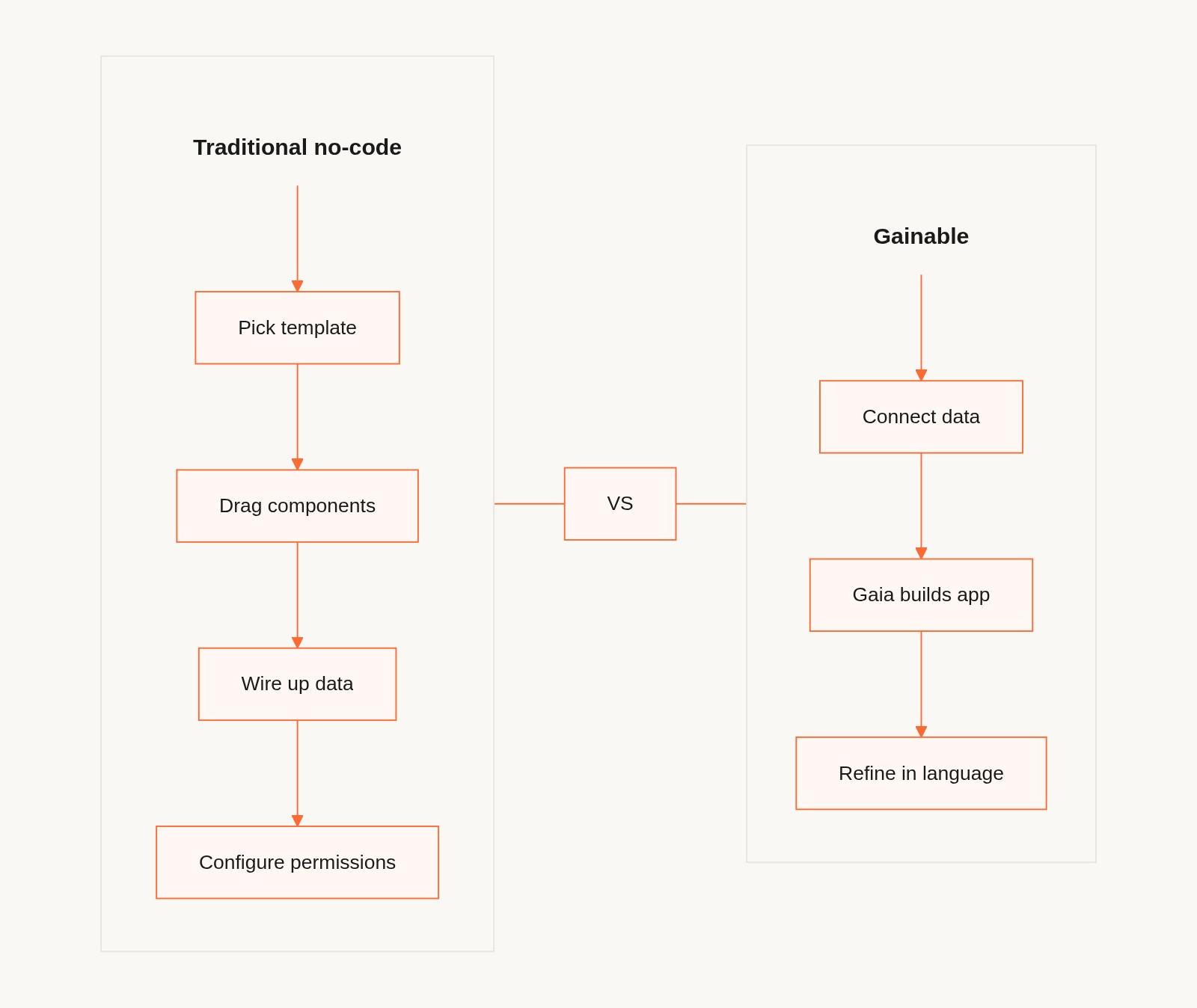
Most no-code app builders ask you to design an app from scratch. You drag in components, configure data connections, manage permissions, and repeat. All before a single team member can see anything useful.
The category has shifted. The best tools in 2026 infer what your app should look like from the data you already have. You connect your CRM, your spreadsheet, or your ops database, and the platform builds the structure for you. What used to take a developer a week takes a non-technical ops manager an afternoon.
We evaluated these tools on five criteria.
- How fast does it go from data connection to usable app, without IT help?
- Which data sources does it natively support (HubSpot, Sheets, Salesforce, Airtable, and so on)?
- Can non-technical team members maintain and update the app themselves?
- Does it handle real-time data sync, or does it snapshot?
- What happens at scale, including permissions, multiple data sources, and larger teams?
1. Gainable. Best for turning your existing CRM and spreadsheet data into team apps, fast
Gainable is purpose-built for teams who are tired of being the middleware between their data and their colleagues. The platform's AI engine, Gaia, reads your data sources (HubSpot, Google Sheets, Salesforce, Stripe, Airtable, and more), identifies field names, data types, and relationships, and builds a full-stack team app automatically. There's no field mapping, no ETL work, and no developer needed.
Key facts:
- Pricing: $99/month flat rate for unlimited users. 7-day free trial.
- Supported data sources: HubSpot, Google Sheets, Salesforce, Stripe, Airtable, Jira, Databricks, Supabase, Linear, PostHog, Google Analytics, Workday, Typeform, Attio, Folk CRM.
- Authentication: OAuth or API key.
- App refinement: natural language ("add a filter by deal stage," "show only overdue items").
- Permissions: role-based views, one-click publish and share via link.
- Unique capabilities: Autopilot (agents that watch data for anomalies and draft actions for your approval), Gaia Copilot (natural language Q&A against live records), built-in collaboration with comments and file sharing tied to records.
What sets it apart: Most no-code tools require you to design the app. Gainable reads what your data implies. Deal data becomes a sales pipeline. Account data becomes a collections tracker. Inventory data becomes a warehouse view. The result is an app that reflects your actual business, not a blank canvas you need to fill.
Limitations: Gainable is focused on team-internal operational apps. If you need a consumer-facing SaaS product or a heavily branded external portal, other tools are a better fit.
Bottom line: For ops managers, sales leads, and finance teams who want a working app from their live data without waiting for IT, Gainable is the fastest path.
2. Retool. Best for developer-supported internal tools
Retool gives developers fine-grained control over internal tools. It's powerful but requires technical involvement. A developer needs to wire up queries, manage components, and handle deployment.
Key facts:
- Pricing: Free for up to 5 users; paid plans from $10/user/month.
- Best for: engineering-supported internal tools teams.
- Data connections: strong, with a wide range of databases and APIs.
Limitations: Steep learning curve for non-technical users. Not a self-service tool for business teams.
Bottom line: Retool works if you have a developer on the project. Without one, it creates the exact bottleneck you're trying to escape. See the full Gainable vs Retool comparison for a feature-by-feature breakdown.
3. Softr. Best for external portals built on Airtable
Softr is well-established for building client portals, member directories, and simple internal tools, particularly when the underlying data lives in Airtable or a Softr-native database.
Key facts:
- Pricing: Free plan available; paid from $49/month.
- Best for: client portals, partner extranets, member sites.
- Data connections: Airtable, Google Sheets, HubSpot, Notion, SQL.
Limitations: Softr is optimized for portals and externally-shared apps rather than deep operational team workflows. Its AI features are still maturing. It works best when Airtable is your primary data source.
Bottom line: Softr is the right pick for external portals and client-facing apps. For internal operational apps built from live CRM or multi-source data, you'll hit its limits quickly.
4. Glide. Best for simple mobile apps from Google Sheets
Glide is the fastest way to publish a simple read/write app from a Google Sheet. It excels at single-source, mobile-first use cases.
Key facts:
- Pricing: Free plan; paid from $49/month.
- Best for: field teams, single-source data apps, mobile use cases.
Limitations: Limited to simpler data models. Multi-source integrations are limited without significant workarounds.
Bottom line: Glide is the right pick for simple, mobile-first apps from Sheets. It's not suited for complex cross-source operational apps.
5. Bubble. Best for complex, consumer-facing SaaS products
Bubble is the most powerful no-code builder for building what looks and behaves like a custom SaaS product, with user authentication, complex logic, and custom UI.
Key facts:
- Pricing: Free plan; paid from $32/month.
- Best for: founders and product teams building SaaS MVPs.
Limitations: Significant learning curve. Building in Bubble takes longer than drag-and-drop tools. Not designed for internal ops apps.
Bottom line: Bubble is the right pick when you're building a product, not a team tool.
6. AppSheet. Best for Google Workspace teams needing automation
AppSheet (Google) is free with Google Workspace and builds well on Sheets and Google Drive data. Strong automation capabilities within the Google ecosystem.
Key facts:
- Pricing: Free with Google Workspace; standalone plans from $5/user/month.
- Best for: Google Workspace-native teams with moderate complexity.
Limitations: Ecosystem lock-in. Non-Google integrations are limited. UI customization is constrained.
Bottom line: AppSheet works if your entire stack is Google. Otherwise the ecosystem limits will frustrate you.
7. Airtable Interfaces. Best for teams already living in Airtable
Airtable's Interface Designer lets teams build custom views and dashboards from Airtable bases without needing a separate tool.
Key facts:
- Pricing: Included in Airtable plans (Team from $20/user/month).
- Best for: teams already on Airtable who want cleaner views for non-technical stakeholders.
Limitations: Only works with Airtable data. Not a standalone app builder.
Bottom line: Airtable Interfaces is the right pick if Airtable is already your source of truth. For multi-source apps, you need something that connects beyond Airtable.
Side-by-side comparison
| Tool | Best for | Key data sources | Technical skill needed | Pricing (starts at) |
|---|---|---|---|---|
| Gainable | Ops teams, CRM-to-app, multi-source | HubSpot, Sheets, Salesforce, Stripe, 10+ more | None | $99/mo unlimited users (7-day free trial) |
| Retool | Developer-built internal tools | Databases, APIs | Developer required | Free / $10/user/mo |
| Softr | Client portals, Airtable-based apps | Airtable, Sheets, HubSpot | Low | Free / $49/mo |
| Glide | Mobile apps from Sheets | Google Sheets | Low | Free / $49/mo |
| Bubble | Consumer SaaS MVPs | Own database, APIs | Medium | Free / $32/mo |
| AppSheet | Google Workspace apps | Sheets, Drive | Low | Free with Workspace |
| Airtable Interfaces | Airtable dashboard views | Airtable only | Low | Included in Airtable |
Recommendation by use case
If you need to turn your HubSpot data into a shared team app without involving IT, go with Gainable. It's purpose-built for this. Connect HubSpot, let Gaia build the app, refine in natural language, and share with your team.
If you need a client portal where customers can log in and see their data, go with Softr. It's the strongest tool for externally-facing, permissioned portals.
If you need a complex SaaS product with custom logic, go with Bubble. The learning curve is real, and the power is there.
If your whole team is on Google and you just need a simple app from a Sheet, go with Glide or AppSheet, depending on how much automation you need.
If you have a developer and want full control over the internal tool, go with Retool.
Still weighing platforms? See how Gainable stacks up across our head-to-head comparisons.
FAQ
What is a no-code app builder?
A no-code app builder is a platform that lets non-technical users create functional software applications without writing code. Instead of programming, users connect data sources, configure logic, and design interfaces through visual editors or AI-assisted tools. In 2026, the best no-code builders go further. They infer app structure from your existing data and build automatically.
Can I build an app from my existing HubSpot and Google Sheets data without a developer?
Yes. Gainable, Softr, and Glide all connect to Google Sheets and HubSpot. Gainable is the most direct path. Connect your data sources, and Gaia builds the app structure automatically based on what your data implies. No field mapping or template configuration is required.
What's the difference between Gainable and Softr?
Gainable is built for internal operational team apps from live multi-source data. It reads your CRM, spreadsheet, or database and generates the app automatically. Softr is better suited for external-facing portals (client sites, partner extranets) built primarily on Airtable. If you need your team to work with live HubSpot or Salesforce data in an app they actually use every day, Gainable is the right fit.
How long does it take to build a team app from existing data?
With Gainable, connecting a data source and generating a working app takes less than an hour for most standard use cases like sales pipelines, collections trackers, and inventory views. Refinements like filters, views, and permissions are made in natural language and apply immediately.
How much does Gainable cost?
Gainable is $99 per month flat for unlimited users in a workspace, with a 7-day free trial. Pricing is per workspace, not per seat, so adding teammates doesn't change the bill.
Do I need to know how to code to use these tools?
No. All tools on this list are built for non-technical users. The distinction is how much configuration is still required. Gainable requires the least upfront setup because it reads your data and builds the app for you. Retool requires a developer to configure queries and components.
What data sources can Gainable connect to?
Gainable supports HubSpot, Google Sheets, Salesforce, Stripe, Airtable, Jira, Databricks, Supabase, Linear, PostHog, Google Analytics, Workday, Typeform, Attio, and Folk CRM, with more connectors being added. Authentication via OAuth or API key takes seconds per connector.
This article was written by the Gainable team. Gainable is listed in this guide as the top recommendation because we believe it is the best fit for the specific use case of building team apps from existing CRM and spreadsheet data, which is what Gainable is built for. Other tools are listed because they genuinely serve different use cases better.