
Your terminal just learned to ship internal apps
Connect Gaia to Codex and it builds, validates, and deploys complete internal apps. You describe, the harness compiles, the result goes live.
two commands, then you are building
for the skeptic
Yes, you could build this yourself.
That was never the problem. Whether it is worth your week was the problem.
You can write the fiftieth internal CRUD app in your sleep. You just have better things to build. Gaia takes the chore so you keep the craft.
Hand-build them and you own every one: a dozen auth flows, a dozen security reviews, a dozen stacks to patch. Gaia ships one validated stack for all of them.
This is not low-code. Every build is real Express and MongoDB you can pull, edit, and own. You stay the engineer, you just skip the boilerplate.
the hook
The request you used to decline
An operator walks over with a spreadsheet and asks, can you make an app from this? The honest answer has always been no. Not because it is hard, but because it is two weeks of scaffolding, auth, CRUD endpoints, and deployment for an app with eleven users. Gaia changes the answer to: give me six minutes.
> Build an app from deals.xlsx
# Gaia reads messy real-world sheets: headers, label rows,
# cross-sheet relations. It asks only what it can't infer.

# deterministic pipeline: models → seed → UI → copilots → autonomy → audit
# 2-3 minutes, streamed as live stage updates inside Codex

> Publish it
{"event":"app_published","payload":{"url":"https://deals-pipeline.gainable.app"}}
Spreadsheet to public URL without leaving Codex.
the result
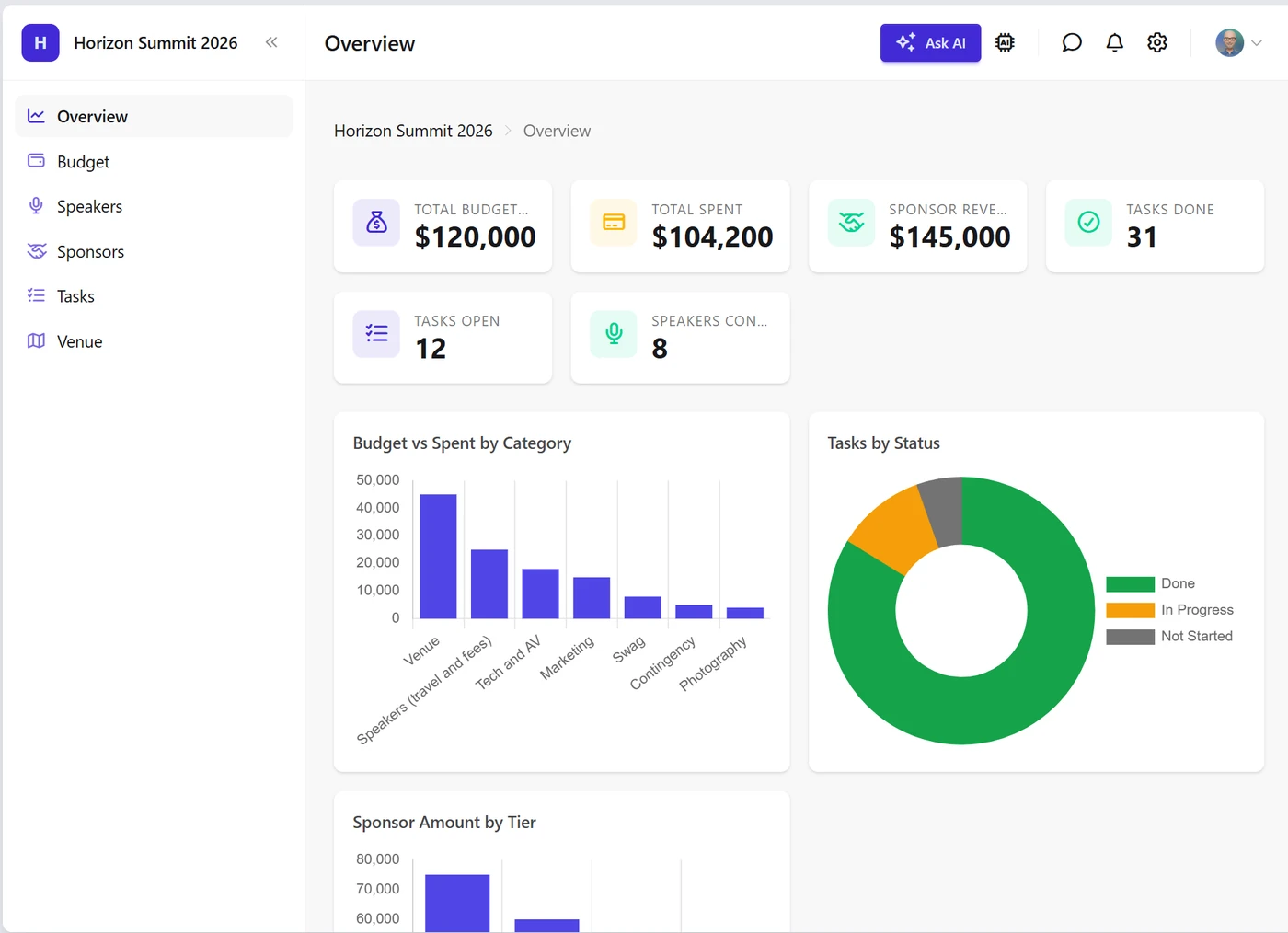
One build, live at a public URL. Sidebar navigation, seeded data, charts, KPIs, and an embedded Ask AI copilot, all generated and deployed in one pass.
beyond the one-off
Data that keeps itself current
A spreadsheet is a snapshot. A live source, an internal API or a partner feed, becomes a dataset once and then syncs on a schedule. Your script emits JSON, every app reading it stays current, and nobody re-uploads anything.
> Create a dataset called "Ops Metrics" from what collect.js prints
# types the columns, picks a stable key, prints the write contract

> Run collect.js and sync Ops Metrics
✓ metrics: 214 rows (+3 ~209 -2)
# each run replaces the whole dataset, one full snapshot.
# put it on a schedule and every app reading it stays live.
Create once, sync forever, from any source you can script.
how it works
Near-zero error rate, by construction
A guided conversation defines data, derivations, seed, UI, and autonomy.
The result is a signed contract, not a vague prompt.
Compilers emit the code. The LLM decides, the compiler writes.
Around 100 validation rules, structural validators, and a multi-pass audit run server-side before anything reaches you.
Fewer turnarounds, less debugging, faster time to deploy.
the comparison
We measured one build
A real one-shot build, no retries and no manual fixes: an event operations app with tasks, speakers, sponsors, budget, and venue management.
120 files, 18,600 lines of code
20 data models, 31 API route modules, 8 views
Two orders of magnitude cheaper and faster. The engineering time you save is the real multiplier.
fleet economics
Millions a year, from one connector
$1M to $5Msaved per year
For an organization routing 300 to 1,000 internal apps a year through the harness instead of building them from scratch.
One connector puts the harness in every Codex seat, and every internal app request resolves through it instead of becoming an engineering project. The number above is not a projection, it is multiplication:
Each app saves roughly $150 to $300 in tokens and 2 to 5 days of engineer attention, about $3,000 to $5,000 fully loaded.
The math is deliberately conservative: even at a single engineer day per app, the thousand-app row still clears $1M. And the bigger number is the demand that never gets served today: when an app costs minutes instead of sprints, the declined backlog becomes buildable, and the spreadsheets and per-seat point tools those apps replace stop renewing. Session economics scale the same way: a harness build consumes a few thousand relay tokens of a seat's budget instead of the millions a from-scratch rebuild spends — a finished app is over 200,000 tokens of code before a single line is read or tested — so the same fleet rate limits go dramatically further.
what you get
Complete apps, one stack, no lock-in
Complete apps, not prototypes
One build produces dozens of files, often more than a hundred: views, CRUD API endpoints, data models, derivations, seeded data, charts, embedded chat, and AI copilots. The feature set is rich from the first build.
One framework for thousands of apps
Every app ships on the same stack with the same SSO, role-based access, seat-managed invites, audits, tracing, and analytics. One security review and one upgrade path instead of a sprawl of one-off tools.
Agent-native by default
Every account gets an MCP server, so the app you build this morning is a queryable, writable data source for Codex, ChatGPT, or Claude this afternoon. Apps embed their own copilots and can run autonomous autopilot behaviors.
The harness does the legwork, your session stays light
The generated files never enter your context. From scratch, a finished app is 200,000+ tokens of code just to type once — millions more to read, test, and fix. Through the harness: a few thousand relay tokens. Server-side, a complete app runs $0.50 to $1.50 in tokens on the most capable model.
Operators and developers, same app
Operators iterate in natural language from the Gainable UI while you work from the terminal. Both surfaces edit the same app, so handing off no longer means handing over.
Real code, no lock-in
Generated apps are plain Express, MongoDB, Alpine, and Tailwind. Inspectable, exportable, and always one command away from hand authoring.
one turn
Iterate like you talk
> add a probability column to the deals table
✓ completion ready: 2 files changed
Each refinement is a single turn. The harness's planner decides, the BuildAgent edits, validators check, and the summary streams back into your session.
two modes
No cliff between no-code and code
harness mode (the default)
> rename the Stage column to Pipeline Stage
One cheap turn. The planner and BuildAgent do the work server-side. Right for most edits, KPIs, fixes, and layout changes.
author mode (you grant it when you sign in)
> write the hero KPI section yourself
# reads the conventions, edits the code, validates, pushes
✓ hero KPI section: 3 files changed
Full creative control with the same conventions and validators the BuildAgent uses. Off by default: you tick a box when you sign in, so a connection that builds apps can't write code into them unless you said so.
get started
Get started in four steps
Add the connector
$ codex mcp add gainable --url https://build.gainable.dev/mcp
Sign in from Codex
$ codex mcp login gainable
# finishes in the browser, credentials go to your OS keyring
Your browser opens, you sign in, and you pick which account to connect. No account yet? Create one free during this step and carry straight on.
Check it is wired up
> List my Gainable apps
Your apps listed back means everything is connected.
Build something
Download this event planning sheet, drop it in an empty folder, and tell Codex:
> Have Gaia build an event planning app using the Excel file in this folder